Problems with locked DLLs when compiling in Visual Studio

For some, as yet to be understood, reason after a few debug sessions some of the dependant DLLs become locked by Visual Studio and the build stage cannot overwrite the DLLs. Today I finally decided to see if anyone else was have the same problem and found this in Gary Farr’s blog (copied in case the blog becomes unavailable);
 
Final solution:
VS basically locks the file and you cannot use third party resources to unlock it.  Therefore, just use VS!  In the Properties of a project in your IDE you have Buld Events.  Basically, you can write scripts during pre and post builds of a project.  I added these two lines in the pre-build event command line, which basically unlocks the dll within Visual Studio.
IF EXIST $(TargetPath).LOCKED  (del $(TargetPath).LOCKED) ELSE (IF EXIST $(TargetPath) (move $(TargetPath) $(TargetPath).LOCKED))
 

Cross Domain Policy file gotcha on a development environment

I hit a little gotcha today when using Silverlight to talk to a Service. My solution has a separate web and wcf projects. So, without thinking, it didn’t suprise me that the Silverlight app running in the web site moaned about security when trying to talk to the service (http://projects.nikhilk.net/WebDevHelper is a great add-in for IE if you want to inspect the http requests on a development machine). So I placed a clientaccesspolicy.xml in the service and everything worked fine. Later it struck me that in this instance (for various reasons) the service should actually exist in the web site rather than a separate project. So I moved the service over and didn’t bother to move the policy file, after all I will no longer be going cross-domain. So I was initially puzzled as to why I was getting the security faults again. The problem stems from my use of a virtual directory on my dev machine. So my web site is at something like; myBox.myCompany.com/devSite/default.aspx. However, when Silverlight looks for the domain policy it looks for at the root of the domain so; myBox.myCompany.com and unsurprisingly it cannot find the policy file there. So I just had to copy the file to the root of default site and everything was fine.

MacBook with broken case…fixed!

My little white MacBook has been through the wars…well not really. I look after it very well, so I was very angry with the case started to split apart. Also about the same time the machine would often refuse to go to sleep and would sometimes just switch off with no warning. All of which seemed to be down to the Bluetooth module playing up. Basically it was looking like time for the knackers yard for this little PC. So it was with some interest that a collegue told me that Apple had actually admitted that the case problem was a design fault and would fix it out-of-warranty. So after a long, if polite, conversation with Apple Support (complete with dictating various Forum URLs saying about Apple relenting) they gave me a ticket number and a number to call for repair. When I took it in I asked if they could check that the Bluetooth module was correctly seated. Today I got the Macbook back complete with new case part AND a new bluetooth module, which was nice. So far the machine seems to working as good as new. So for once, thank you Apple for making me feel like you actually care about your customers. Thanks again, keep up the good work.

“Bad class token” when running (N) unit tests with TypeMock

Had a strange problem today, some of the automated build tests were failing with "Bad class token". However, when I went onto the build machine and ran them via NUnit GUI they worked fine. The difference is that we’d normally run the tests via Type Mock to ensure all the mocks work correctly. When I ran NUnit GUI via TypeMock the tests would fail…well actually sometimes they’d work, sometimes they wouldn’t. Yes that’s a lovely position to be in <gulp>. The obvious cause to these problems was that I’d just upgraded Visual Studio 2008 to SP1. So I manually rebuilt the whole solution and everything seemed to spring back to life again. Odd problem but hopefully now someone else won’t have to sit around scratching their head like I had to!
 
[Edit]
I blogged too soon. Turns out I still have the problem, but only with automated builds, if I build by hand (on the build server) then everything runs fine…weird.

[Edit]
Turns out I "just" needed to upgrade TypeMock to the latest version.


How to add a Silverlight project to an existing Web Project

Whenever you play with Silverlight via Visual Studio you soon learn about the link between the Silverlight application and the web site’s ClientBin folder. However, what happens if you already have a web site project and want to add a new (or existing) Silverlight project to it? Well you either manually copy the xap over after every build (no thanks) or just go the web site’s properties and select the Silverlight tab and add your project to it. Easy…I hope that’s not tempting fate.

How to make Vista shutdown when you press the big “off” button

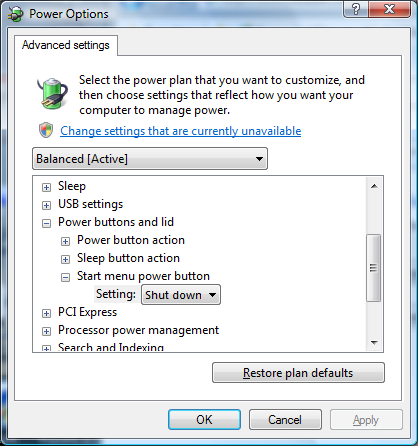
I finally cracked today and had to find out how to change Vista’s default go-to-sleep when you press what looks like the off icon. I’d dismissed the Power Options because when it talks about the, “power button” it literally means the physical power button. However, if you customize the power options and select advanced you can change it…

image

The button then goes a very dark red.

nHibernate CreateQuery gotcha

As an nHibernate newbie I wasted a bit of time trying to get the Hibernate Query Language (HQL) CreateQuery function to work for me. Even the simplist query failed to work, e.g. I have a class MyEntity and I wrote something like;
session.CreateQuery("From MyEntity as myEntity")
 
then nHibernate would give me errors such as "in expected", or "uknown token as". I’d read a bit about problems where the mapping may not have been processed yet but that couldn’t be the case because I’d previously successfully loaded a MyEntity. However, it did prompt me to ask the SessionFactory for the metadata about MyEntity. What I spotted was the EntityName included, now obviously, the fully qualified name of; MyNamespace.Bla.Yada.MyEntity. Therefore the correct syntax is;
session.CreateQuery("From MyNamespace.Bla.Yada.MyEntity as myEntity")
 
I’ve yet to find a way to add namespaces to the query but at least the thing works now!


How to remove items from a bound list box or how to avoid “Operation not supported on read-only collection.”

Today I got a rude error message from my application when I attempted to do a very simple operation, that of removing an item from ListBox; "Operation not supported on read-only collection."

The problem stems from the fact that I’d bound my ListBox to an ObservableCollection, once bound the Items collection becomes read-only. A know some others have had the same problem so I thought I’d blog about my solution.  Utilizing a function, I’d previously blogged about, to find the ListBoxItem from a button click I then do a little casting and the item is removed;

private void buttonDelete_Click(object sender, RoutedEventArgs e)

{

    ListBoxItem selectedItem = FindAssociatedListBoxItem(sender);


    // if we have found an item then remove it

    if (selectedItem != null)

    {               

        MyColl myColl = this.ListBoxProducts.ItemsSource as MyColl;

        MyObject selectedObj = selectedItem.DataContext as MyObject;

        myColl.Remove(selectedObj);

    }

}

WebDD 09 – a quick blog

Last Sat’ I attended WebDD 09, here is my brief summary;

What’s New In Silverlight 3? – Mike Taulty
Mike is a good speaker and knows his Silverlight onions so I thought this one would be worth attending even if I have read about the majority of the changes. Overall it was a good session and it’s good to see live demos of the changes. One of the demo’s failed but Mike was determined to provide an answer why and was forthcoming a couple of couple of hours later (and on his blog).

What’s good in .NET 4 and Visual Studio 2010 – Alex Mackey
The idea behind this session was to preview the, "new stuff". However, I came away from this session a little disappointed. I was hoping for some insights but what I got was really a summary from publicly available blogs and CTPs. Still it was ok and it’s quite a nice idea for someone to collate these remours into one place but to paraphrase Alex, ‘I’ve not looked deeply at X because it’s likely to change’ so perhaps this session is too early to watch too?

I want it on that one, that one and that one! And it all needs to be synched! – Andrew Westgarth
Andrew presented the deployments options in II7. I was interested to see the Deploy utility, that seems to be an implementation of a Powershell host, and I especially like the idea of easily keeping production and test sites in sync. However, that was really the interesting part of the session and the rest felt like it was just repeating itself. I think this was probably due to the fact that almost all the demos failed and probably took all the momentum out of the session.

An Introduction to jQuery – Andy Gibson
I took a chance on this one since I have been dabbling with jQuery so I should be beyond an introduction now but I thought I might learn something I’d missed. Overall the session was a decent introduction to jQuery, although since I understand it you’d really have to ask someone who was new to jQuery, and it was reassuring to hear some things I’d guessed at rather than knew for certain.  For a WebDD I would have liked to have seen an intermediate/advance session rather than a introduction.

ASP.NET MVC best practices – Sebastien Lambla
Sebastien provided a witty and interesting session on what was wrong with the out-of-the-box MVC framework and how his teams worked around them. I really liked this session even if the demo gods caused a blue-screen and other demo failures. I just felt he could have quickly introduced the Windsor framework as I could see a number of people were confused by its sudden use but that’s only a tiny point. Suffice to say that I’ve added his blog to my reader

ASP.NET 4.0 – Mike Ormond
Mike is a another MS session stalwart and presented a good session on ASP.NET 4. Although all the nice things about ASP.NET Ajax WPF style binding was good to see I felt like shouting hallelujah at the control provided over Client IDs, something I’ve been campaigning for on forums. For me ASP.NET is a terrible framework but I concede that v4 looks to finally have started to consider professional developers so maybe I’ll be enticed back…maybe.