Trip to the Fields of Flanders

Not my usual IT related comments but I felt compelled to post. I’ve just got back from a trip to Bruge which included an excursion to various locations and cemerateries related to World War 1 (http://www.visitbruges.org/). It may seem like a depressing subject but I think everyone should make such a trip. It really is worth getting some sort of understanding of the huge loses and suffering of the people involved. Our trip was a small group which consisted of couples from Australia, Britain and Canada. Consequently we visited cemetaries and memorials for those nationalities and were taken to locations where those troops were involved. I’m not going to attempt to describe all the things we saw (or spoil it – see it yourself) but just to say that I haven’t stopped thinking about it since. Without lapsing into communism it has certainly made me think more about;  how violence isn’t a great way to resolve a problem, and when I think things are bad (like the fact our water main has collapsed and we’ve got dodgy water) people managed to live (if they were lucky) through years of unimaginable horror – so perhaps I should just smile and be more thankful.

I must admit that after the visit I have become a bit of WWI bore and have read ‘World War 1’ by David Shermer which amazed me about just how many counties were fighting all over the globe. It’s also very interesting to see how it affected ‘modern’ politics. I thought I’d add a litte wikipedia style facts from the book;
Toll of lives (my approximations):
Civilian (not including a huge flu outbreak)  9-12 million
Military:
Germany  1.7-2 million
Russia 1.7 million
France 1.36 million
Austria-Hungary 1.2 million
Great Britain 0.76 million
British Empire 0.25 million
Italy 0.65 million
Turkey 0.37 million
United States 0.12 million

Total Casulaties 37,500,000 – imagine the potential of all those people
Economic cost £75,077,000,000 – and that’s nearly a century ago
E.g of physical damage – France; forests lost 1,875 sq.miles, 8000 sq.miles farm land, 0.25 million buildings
Quote from the book, ‘These are cold statistics…the disillusionment…ordinary poeple realised…the horrendous price for reordering the world’s affairs’.
Mine and the books parting quote;
‘I have given orders to my Death Units to exterminate without mercy or pity men, women and children belonging to the Polish-speaking race. It is only in this manner that we can aquire the vital territory which we need. After all, who remembers today the extermination of the Armenians?’ Adolf Hitler, 22 Aug 1939

How to stop the CLR optimizing your variables during a debug session

Finally decided to see if there was something I could do to stop the CLR optimizing away all the variables when I want to remote debug an application. This seems to have the answer, http://blogs.msdn.com/tom/archive/2008/05/09/getting-more-information-from-clrstack.aspx
Essentially, create an myfile.ini for your dll/exe and put the following in it;
[.NET Framework Debugging Control]
GenerateTrackingInfo=1
AllowOptimize=0


iE6 + default Silverlight + https = unsecure prompt

IE6 (ah bless) is oddly paranoid when rendering https sites. This can be seen when it attempts to use a page that contains a Silverlight application. The problem stems from the default template Visual Studio generates for hosting the application. It contains a invisible iFrame element, apparently to support Safari. However, if you attempt follow the links to explain why Safari needs such a hack you hit a dead-end. Assuming that was because Safari 4 has since been released I tested the previous problem, that you can’t correctly browser-back to a page with SL content. It seems to work fine. However, Ken Tucker pointed out that Silverlight Navigation now requires the use of this iFrame. So the simplest solutions is to add a src="#’ attribute to the iFrame – this doesn’t seem to cause any problems to "modern" browsers and IE6 now understands that the src is secure.

Upgrading from 5.3.1 to 5.3.4

For some strange reason when my existing projects referenced Type Mock and Type Mock Isolator it would mark Type Mock as copy local true and Isolator as false. However, after upgrading to 5.3.4 when I add a reference the opposite occurs. This causes a problem when upgrading a project and the project continues to use Type Mock as the local copy (5.3.1) and Isolator and the new version (5.3.4). This leads to some strange behaviour. So double check your references after upgrading.
 

Using Blend to set the colour of the text in a button

Silverlight & Blend try and encourage you to separate styles and structure in much the same way as you should with HTML and CSS. However, Blend can be confusing as it will offer up some properties to be changed but “hide” others. One example of this is the seemingly simple task of changing the colour of the text in a button. You’d be forgiven for thinking you can select the button and directly edit the foreground colour since the background is available. You must ignore this temptation, if you don’t attempt to make style changes directly to the structure (control) then you’ll avoid a lot of confusion. I’ve created a little tutorial to show one way of solving this;

  1. Create a new project in Blend and accept the defaults.
    image
  2. Add a button
    image
  3. Select the button, hint using the control tree is often more reliable, right-click and choose Edit Templatate->Edit a Copy. To promote separation I recommend saving the style to the Application. You should give the style a good name, but I’ll be naughty and leave it at ButtonStyle1
    image
  4. You’ll now find yourself in the Template for the button. Ignore this and return the MainPage.xaml (there is a quicker way but lets keep things simple). Now you want to change the colour of the button, so you need to edit the buttons style. Select the Resources tab and click the button to edit ButtonStyle1
    image
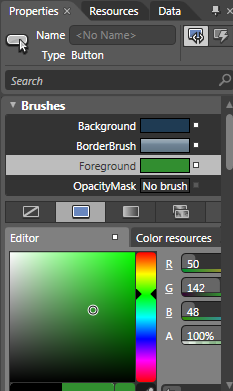
  5. Now switch back to the Properties tab and you can change the Foreground (remember to drag the little colour select from the bottom left of the selector).
    image
  6. All done.

So the “take home” from this is don’t make style changes directly to your controls always look at changing the separate style xaml, not only will you have better separation but you’ll avoid a lot of frustration when trying to find the property you want to change.

Update Service Reference not working?

The integration provided by Visual Studio between Silverlight and and WCF Service is good but can be frustrating. Here are a couple of simple things to try when things don’t appear to be working;
1. I’ve created/changed my service but when I update the reference or attempt to discover the new sevice it can’t be found – make sure the service has built by rebuilding the service
2. I’ve changed the service and ran ‘update the service reference’ but my Silverlight code cannot see the changes, in fact it seems to have lost all references to the proxy code – rebuild (not compile) the Silverlight project.
 

Windows 7 64bit, sharing Canon printer with 32bit clients

My trusty Canon MP800 printer was shared to my home network via it’s Vista 32-bit host, however I’ve now installed Windows 7 64-bit. The problem is that although you can share the printer easily enough you have to allow the "server" to have the 32bit drivers available to the clients. The problem is that when you tick the 32bit architecture and try and search for the drivers it won’t detect them, I’m guessing the downloaded 32bit driver package hides the actual drivers until you do a normal install. You can’t do a normal 32bit on a 64bit OS. Luckily I discovered this post that I’ve duplicated (in case it gets losts);
 
 
To share printers across a network between Vista x64 and any other operating
> system do the following.
>
> Vista
> ——
> Click Start >>
Control Panel >> Hardware and Sound >> Printers
> Click on Add a printer
> Select Add a local printer
> Create a new port >> Local Port >> Click on Next
> Enter the port name for the network printer (i.e. \\
Computer Name\Printer
> Name)
> Select the printer from the list
> Continue until the printer is installed.
>
> Other operating systems
> —————————-
> Find the Add printer wizard and do exactly the same method as for Vista.
>
> With any luck your printer will already have printer
drivers included with
> Vista and obtaining drivers for other operating systems if they are missing
> should not be a problem.
>

Windows 7, where has my DVD Drive gone?

Just had a problem burning a file to disc, when I rebooted and checked "my computer" the drive had vanished. After checking the Device Manager el al I couldn’t find any problems. Then I realised what was happening, it now only shows the drive if there is something in it to read! Gotcha!
 

Digitally code signing Office VBA macro

Had some fun today with code signing some macro’s in Excel. Applying a code signing certificate is very easy, simply go to the visual basic editor, tools->Signing and you’re away. The problem is creating the correct type of certificate in the first place.

My sys admins provided with a p7b certificate. So I installed that, but it didn’t show in VBs available certificates. So I thought I’d better try and understand what was going on. It turns out that although I need a pfx certificate and a p7b, that it is just part of formula for creating such a beast. You need the private key used to create the original certificate together with the p7b;

pvk2pfx -pvk privateKey.pvk -spc codeSignCert.p7b -pfx actualCodeSign.pfx -po myPassword -f

That will challenge you for the password used to create the original certificate but will produce required pfx file. Now just install that and it should be available for signing

Windows 7 on Parallels

Vista on Parallels 3 was good, Vista on Parallels 4 was terrible. So I wasn’t too bothered in ditching my Vista VM and installing Windows 7, even though it’s only marked as ‘experimental’. Well so far it’s been as good as P3, so I’m very happy with it. Don’t know where the blame falls for P4+Vista but P4+Win7 is worth having.