How to log .net binding errors when you don’t have fuslogvw.exe

One of those sticky production problems is when you are faced with a ‘Could not load file or assembly’ type problem and you do not have the .net SDK installed…so no fuslogvw.exe. Today I shown the following extract from StackOverflow


HKEY_LOCAL_MACHINE\SOFTWARE\Microsoft\Fusion

Add: DWORD ForceLog set value to 1 (DWORD )

LogFailures set value to 1 (DWORD)

LogResourceBinds set value to 1

LogPath (String) set value to folder for logs ie) C:\FusionLog\

One thing to add is that after making those changes you’ll probably want to reset your process e.g. for a web sever (IISRESET), COM – shutdown application, etc. Then you can restart and look into the folder you entered for the LogPath.

Using NuGet with Visual Studio Express

A quick “tip”. Currently Visual Studio C# 2010 Express cannot install the NuGet extension. To workaround the problem you must have Visual Studio Web Developer Express. The NuGet extensions has been signed to work with VWD. Then to install a NuGet package for your VCE project do the following (it’s not nice);
1. Create your project in VCE, save and close
2. Open the project in VWD, it will probably complain but just ignore it
3. Run your NuGet command, e.g. Install-Package
4. Save and close VWD
5. Reopen VCE, add reference and browse to the packages folder that is now in your solution.
There, it’s not nice but it does work

Beware of duplicate cookie values

Came across a strange problem today that I thought I should record since I’ve already wasted enough time investigating it. The problem was that a web site was recording a setting to a cookie each time a page was unloaded; e.g. Preference1. Any page can then read the cookie and take appropriate actions. However, for some reason the preference was not correctly read on any other page. Puzzled I examined the document.cookie property. For some strange reason the value was duplicated; e.g. Preference1=hello; Preference2=bla; Preference1=goodbye. So when the page wrote to the cookie the 2nd version changed but when the cookie was read the 1st version was taken. Once I cleared the cookies for the domain everything went back to normal. The site only has one domain, no sub-domain or anything. Very strange behaviour.

So there it is, an aide memoir for me, but if anyone can provide an explanation I would be grateful. I should mention this was all client side JavaScript.

Intellisense (for jquery) in MVC razor views

Another quick tip. When using master pages or razor layouts you tend to put the script includes in the master but this means your child or view pages do not include any references to the scripts. Therefore you start writing some jquery in your view an Visual Studio does not provide any intellisense. So put the following at the top your view;

@if (false)
{

<script src=http://ajax.googleapis.com/ajax/libs/jquery/1.6.2/jquery.min.js type=”text/javascript”>

</script>

}

How to prevent autocomplete on textboxes in html

Just a quick one because I keep forgetting how to do it. If you want to stop your form displaying suggestions in text boxes that were based on previous entered values, then add the following attribute to your html form tag; autocomplete=”Off”

How to transfer apps with Windows Phone 7 (wp7)

I was fortunate enough to get a second Windows Phone 7 today and naturally wanted to transfer all my hard-collected applications from the old wp7. I visited Zune expecting there to be some form of ‘restore applications’ button. Sure enough under purchase history it listed all my applications – happy days. However, when I selected an application it says to open MarketPlace. So I went to the new phone, opened MarketPlace and nothing. Hmm. I then visited www.windowsphone.com and looked at my phone->my account. There was the same list of applications, however this time there was a big fat ‘restore’ link. It then prompted to select a phone and one ‘restore’ later the application silently installed on the new phone. Hurray. I would say that the process could be a lot easier. A nice set of checkboxes rather than doing the painful task for each app would be nice Confused smile, and some sort of feedback on the phone to say it was installing would be useful too. But at least my paid for apps are back…or so I thought…

My phone operator is ‘Orange’ and they provide a nice add-on to MarketPlace called ‘Orange Selects’. It would seem that any application I’ve downloaded from there, free or otherwise, cannot be reinstalled – ‘sorry there is a problem’. Suffice to say I’m not very impressed, especially since I’m still using the same SIM and contract. So BEWARE.

EDIT: thanks to keyboardp for this; if you attempt to buy an app that you have previously purchased/installed then the marketplace will realise this and ask you if you just wish to reinstall it again. It’s a bit off putting to have to press ‘buy’ but it seems to install without incurring a payment.

Workaround for problems Launching Performance Analyzer

Over the past couple of weeks I have been trying to use the Visual Studio 2010 Performance Analyizer on a web site but kept on getting;

VSP 7008: ASP.net exception: “The web site could not be configured correctly; getting ASP.NET process information failed. Requesting ‘http://localhost/VSEnterpriseHelper.axd’ returned an error: The remote server returned an error: (404)

The site is a relatively complex IIS6 site with a number of smoke and mirror redirects so I guessed this complexity was confusing the tools. I contacted Microsoft Support to help. During a shared-desktop session with support it started working! Ah the curse of the support person making it work just by looking at it. What actually happened is that when I launched the Performance Wizard I incorrectly gave it a file URL (\\localhost) rather than a web URL. The wizard prompted to say there were no DLLs to profile but I said to continue (not realising my mistake). The profile finished with no results. I corrected the problem (//localhost) by editing the resulting profile NOT by creating via a new wizard. It works?! So I had created a workaround Confused smile. I then manually added the missing target DLLs and re-ran the profile. No problems, everything worked.
There you go, if you are running IIS6 and having problems getting the Profiler to connect, why not try this ridiculous workaround.

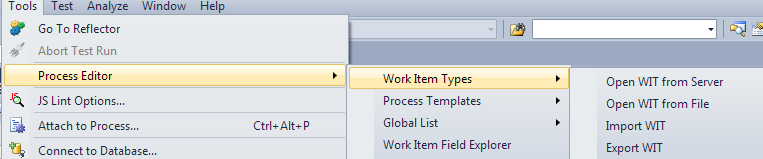
What is Live Mode in TFS Process Editor?

To change the template of an existing TFS project you need to use ‘Live Mode’. However, there is very little information on what ‘Live Mode’ is. It is the editor in the tools menu. If you use that then the change will affect the all new and existing items in the project.

image

Book review of XNA on WP7

Just a quick note to say I’ve submitted a book review on Professional Windows Phone 7 Game Development – Creating Games Using XNA Game Studio-4

What to know if you have a network hub channel clash?

I wanted to diagnose why my wireless hub range was so poor. If you have Windows 7 (or Vista) then you can use the following handy tool;

  1. Open Command Prompt (e.g. start->cmd)
  2. in the command windows type, netsh
  3. wlan
  4. show networks mode=bssid

Then you can not only you move around and measure the signal strength but also see if there are any other wireless devices using the same channel as your hub.