Story of buying a new TV

My old CRT TV finally died on me after almost 17 years of service so it was off the shops to get a new one. First off I did the usual thing of buying a couple of HiFi magazines to see what’s new in the world of TV. Obviously you should never only go on their views so I went to a couple of retailers to see for my service. This is where my I encountered the sellers tricks, which I thought I’d pass on;

"I like the to watch films & sport and I want it as eco friendly as possible but I don’t have any HD inputs, what can you recommend?"
The sales assistant said I should get FreeSat as Standard Definition (SD) would be poor and then went onto to show me a football match (that I actually attended) that he’d recorded. First off SD – oh good grief it was worse than I’d thought, the players had a horrible halo around them, big chunky pixelated squares – yuk. Then he showed me a HD recording and it was better. I admit I didn’t spot the trick at the time, but in fact I’ve just watched a SD football match of my new TV and it’s fine. The trick was the he’s used a hard-disk recording device and obviously set SD to use a higher compression ratio. That’s why it looked like something recorded on a web-cam. So beware of that trick, sure getting a HD source is important but you don’t have to purchasing ugly Sat dishes if you’re just interested in watching TV.

The next problem I had was asking about the sound. The TV I had my eye on hadn’t got the greatest reviews for its sound so I asked to hear a comparison with one of its rivals. The sales guy couldn’t be bothered to do this possible and just gave me a demo with the TV wall-mounted on their flimsy "cool" designer wall. It sounded worse than I thought. So I had to make a difficult choice between picture and sound. In the end I went for picture as I could solve the the sound problem via an amp. One I got the TV home and put it into a sensible position, the sound was fine. Ok not award winning but general TV watching, without the eco-unfriendly cinema amp on, it’s decent enough.

Knowing that my DVD player was also on it’s last legs and that I should get some sort of HD source I decided I’d also get a blu-ray player. I asked about the difference between two players, especially regarding DVD upscaling (as I have a few DVDs). The assistant couldn’t tell me the difference and said upscaling is a waste of time. Hmm, oh well I had a pretty good idea of the player I wanted so I was about to buy the player and the TV and then thought I just check they included the necessary HDMI cable to connect the two. "Oh no you have to buy that". Good grief, what exactly does this guy get paid to do? So I finally got my player & TV home and thankfully it works fine. Oh and after comparing the same DVD (after being conned into owing two copies of Battlestar Razor) you can really notice the upscaling, thanks guy.

So in summary;

1. Do a bit of reading, magazines, forums, etc
2. Find some shops to give you a demo but be very mindful of the source they’re showing you – if you can take your own source, such as a TV recorded on DVD then do so
3. Have a list of questions before you go the shop, because you can’t rely on the sales people
4. If you have the time (I didn’t) get them to demo in a proper demo room.
Visual Studio no longer opens files from Windows Explorer?

“There was a problem sending the command to the program.”

This has been frustrating me for a couple of days now so I decided to see what the issue was. Apparently it appears that the problem is due to couple of issues;

  1. I’d marked Visual Studio 2008 to ‘run as Administrator’
  2. I have multiple versions of Visual Studio

Apparently when you have multiple copies of VS the shell launches the Visual Studio selector program to work out which version it should launch. However, since the selector is running under the normal UAC state it gets a little confused. So rather than set the selector to Admin I returned Visual Studio back to it normal state and I can now open the files.

How to get rid of IE6

I read a tongue-in-cheek comment today about how companies should charge Microsoft to port their IE6 only sites to standards (well IE8). The important problem is more about companies that have some critical (or at least important) bit of web based software that only works with and IE6 client. This is a major problem for web development as you’re typically tied into weak link. So what do you do? Well Microsoft won’t let you run the different versions of the browser side-by-side so you have to install a different browser. Well understandably companies don’t want to do that, be it they don’t wish lots of browsers on the client machine or they just don’t want to confuse their users. No matter how silly an excuse I think that is, the fact remains they want only one browser installed. My belief is that it is impractical to believe that companies will move away from IE6 unless either blackmailed by withdrawing support or they’re offered a single browser alternative. For me the concepts behind Chromes IE6 support is good. If IE9 was to include the browser rendering portion of IE6 then IE9 would be able to go into a special mode that would behave 100% like IE6 for pages that require it. Every other page would be sprinkled with IE9 lovel hearts, well something like that. So what’s it to be Microsoft, the hammer, complete ignorance or maybe a viable alternative?
 

Agile Story Points

I’ve decided to do a bit of a brain dump about estimating stories. The idea  (in an Agile way) is for this to be more of a discussion than a presentation of facts. I’m interested in the different ways people have explained to me how they estimate stories. Since these are not direct quotes I may have misrepresented them or simply, "got the wrong end of the stick". So please feel free to correct me or tell of me other ways you know of. Also note that currently this is unfinished but I’d like feedback ASAP, so I’ve published it.

Methods:

1. Iterative break down of a story

Assign est. to the story. If the est. means you cannot implement the story in a reasonable time (e.g. a sprint) then break the story into smaller stories and assign (hopefully) a smaller est. until all stories fit into the implementation window

1 a) Single story point

To create an est. the team come to a joint decision about the est., possibly using some form of est. poker, the customer can then (directly) compare stories via the "cost" if they wish

1 b) Multiple est. per story

To create an est. specialists in the team assign their own point score to the story. The customer (with the team) has an opportunity to compare stories including the specialist areas. E.g. A graphic designer may quote 5 and a front end developer 2 so the customer may say to continue with the front end work and leave the design for the next iteration/delivery. Another favourite seems to be to split the development and the testing time (probably for those not using a form of TDD)

2. All stories cost 1

Stories are broken down until the team agrees they’d score it 1. This means the stories are less prone to risk as they must be sufficiently decomposed for the team to be happy with a est. of 1. The customer can then make simple comparisons based on priority 

3. No story points

Rather then use any specific form of estimation, stories are judged only on their priority. The stories are evaluated by the team but only at a high level to ensure they seem achievable in the chosen window, typically 3-4 weeks. Stories are then worked on in priority order and are done when they’re done. Kanban seems to use this approach.

Evaluation:

1 a) Single story point

The advantage of a single estimate is that the customer can compare the notional cost of stories. They’ve no idea what a cost is or consists of just that one is relatively more than another and you only fit so many story points into a sprint.

The disadvantages are the opposite of the advantages of 1 b)…

1 b) Multiple est. per story

You have have a team of people with different skills, so to come up with a total cost they can only sensibly estimate about what they do and not what it takes to do someone else’s job. One you have these separate estimates why not be transparent and show them to the customer? This way the customer can make fine grain decisions about the parts of story they want implemented (or changed to cost more or less).

The disadvantages are that the customer probably doesn’t want to get involved in the such details and they is opportunity to do so then it should probably be broken down into separate stories, e.g. one for the function behaviour, one for the design. You can argue that separate skill sets are required everywhere so if you took this approach where would it end, a database est., a UI est., testing est. etc. As a side note testing (and by that I mean both non and automated testing) should be part of the development cost 

2) All stories cost 1

When you estimate a story that is more complicated than 1 then you may end up either taking more time to break the story down into smaller parts or tasks or you implement the story hoping you can figure it out as you go. So why not carry on breaking stories down until they reach a point that you can easily implement them or at least quickly know they’re wrong. Also the customer can now decisions based purely on priority rather than cost (is this practically correct?) A potential problem with this approach is that you may spend a fair amount of time travelling down a set of features that aren’t that important or worst may be thrown out after other iterations are completed and the customer no longer has a need for them.

3. No story points

Kanban is the mechanism I’m least familiar with, well actually I have no working experience with so you’ll have to forgive me for punting my ideas here. It would seem that you can save time by not worrying too much about estimating and rather concentrate on priority. I need to look into this much more.

(note to self; http://epistemologic.com/category/process/lean-software/)


As I’ve already mentioned this is unfinished and I’d like constructive feedback – so please resist the urge to simply flame me. Thanks.

TechEd 09 Berlin

It has been a few weeks now since I returned from TechEd and I’ve been considering writing a review of the event rather than the specific sessions.

“What is the point of attending TechEd?”

As a developer TechEd is the pinnacle of Microsoft Events in Europe, so I would expect;

  1. To see up and coming developer tools & technologies
  2. To have deep dive insights into existing tools & technologies
  3. To be told about good (and bad) practices in developing software
  4. Talk to experts in the MS technologies about specific issues I may have
  5. Discuss the above with other attendees
  6. Inspirational Keynotes
  7. Have a bit of fun and gain some useful goodies

These goals haven’t really changed in all the years I’ve attended TechEd however content delivery technology, and to some degree Microsoft’s attitude to evangelising technology, *has* changed. So if I didn’t attend TechEd, just as I didn’t attend PDC, could I achieve something similar?

  1. If I’m honest, unless you’re in some hallowed circle these sorts of events are the best place to hear/see new tools & technology. However, since TechEd was one week before PDC we got to see nothing, nada, zilch. So if TechEd and PDC are going to continue to clash, I can’t justify TechEd over PDC
  2. Deep dive insights – Online content is now pretty good. Officially ‘sponsored’ MS bloggers and other community experts now regularly create material aimed at various levels. Also let’s not forget that great swathes of the content from such events end up online anyway. So do the pro’s of getting the atmosphere and not having any distractions (see later) outweigh the convenience of watching a session at double speed, skipping the dull bits, pausing for a break, rewinding some key point, etc? When I said distractions I was thinking about the times when you’re studiously watching an online session and someone asks you a question and you don’t get back to the session for ages and you lose the thread. However, some of the sessions, were held in temp rooms with literally paper thin walls. The noise from the corridors was so distracting I just avoiding attending any session in those rooms 
  3. The ‘best practice’ sessions that don’t fall into (2) are usually held as a smaller more discussion based format. This year I didn’t feel they worked very well. I’m not sure if it was just reserved audiences or inexperienced speakers but they were disappointing. So the alternative is to sign up to specific forums and/or meet with user groups interested in your particular tools/technologies
  4. Visiting the [insert your technology here] expert booth is really one of the major advantages of something like TechEd…or was. Many of the experts have blogs and are normally willing to at least direct you to some material to help you out. If not the forums can often answer tricky questions. The other problem I found was I didn’t feel the people on the booths were very helpful, is this a product of standing there having loads of annoying questions asked? Perhaps, did I just choose a few bad eggs, perhaps. Am I just annoying to talk to, probably. E.g. I asked the following questions to the Silverlight experts. Q1 – “One of the trickiest aspects of developing LOB applications for Silverlight is that corporate companies refuse to allow the plug-in to be installed, do you have any suggestions or recommendations that could help?” I was expecting a discussion about pointing out the advantages, stats about security, whitepapers on rolling out the plug-in. What I got was, “it’s not a technical problem”. Really, thanks for that, I’m so glad you explained that to me. Q2 – “My customer wants to install the site on a server where external users come to the site via HTTPS and internal users go via HTTP. This causes me a problem because I’m currently having to get Silverlight to sniff the protocol and adjust its WCF settings accordingly, is there a way to avoid this sniffing as I want the admin to deal with these settings in the config file?”
    Expert (paraphrasing) – “Yes, in IIS7 you can easily configure the server to have two separate config files pointing to the same implementation site”.
    Me – “Really, oh I didn’t realise that, how do you do that”.
    Expert – “It’s easy in IIS”
    Me – “Oh I see”. Hmm, that told me. So off to the IIS Expert.
    IIS Expert – “No, there is no way to do that”…..
    What I expected was at least one of them to say, “here is my email address (or let me take your email) I’ll point you in the right direction/I’ll take a look”
  5. I would like to meet other attendees with similar interests (sounds like a geek dating agency) so I’d suggest TechEd have a technology chill out area were you’d know if someone was sitting there they’d be interested in that subject. The alternative, again, is forums and user groups
  6. From a developers perspective the key note said it all, THIS ISN’T FOR YOU
  7. Berlin was a very interesting place to visit. The Berlin Wall celebrations were great, my night out to see Beth Hart less so – there’s a reason I hadn’t heard of her. But I did enjoy my visit, but mostly off my own back. The credit crunch has hit TechEd, as there was no UK party, and the celebrations were very low key compared to some previous Events. Now the really important stuff (<cheek>), the goodies – not great. Ok Windows 7 is very nice, but I want some dev goodies. Where’s my copy of SQL 2008, Visual Studio, Expression, come on something for the developer. No a DVD from some System Management Event, whoopee. Still at least I wasn’t saddled with a new touch screen laptop like those poor people at PDC – the suckers, no wait…

So it would seem that given the explosion of material on the web and the clash with the PDC, TechEd has somewhat lost its way for the little old developer. I think it needs to address this issues or just come clean and say, TechEd = System Pro, PDC = Developers, you’ll have to grow your carbon footprint if you don’t live in America. Or maybe they could offer me some developer software and all will be forgiven, I’m easily bought.

How to connect to a SQL2008 machine

Ok I admit it, I’m a developer and configuring access to SQL Server is not my bag (baby). SQL 2005 had a nice big Surface Area Configuration button than just allowed access from clients, so I ignored what it was doing, pressed it and got on with my work. However, SQL 2008 seems to be have been targeted at me because it no longer has such a backdoor and forced me to find out what I should do. So I thought I’d write it down for others who prefer to search the web rather then read the documentation <oops>,

First off you need to open the SQL Configuration Manager and check your favourite protocol is enabled, for me that would be TCP/IP. Double click that and select the IP Addresses tab. You’ll notice in there a list of possible IP addresses and ports for SQL to listen on. You can, if you maintain your (mine) lazy tendencies simply change the setting from dynamic to static and plug in port 1433. When clients attempt to connect to your server they attempt to use 1433. Now this isn’t supposed to be a good idea (no idea why – you’ll see why later) so stick with dynamic ports. Now this means that SQL will listening on some port but you’ve no idea what as it may change each time the server starts. So you must start the SQL Browser Service, this acts as the go-between and “tells” the client what port to use. So there you are, you should now be off and running. But why not use 1433? I thought the idea was slow those pesky hackers down, but if you have to open the Browser Service then what does that achieve? Something I need to look into, when I have the time, when I have the time, when I have the time…..

Quick guide to starting a WinMobile widget application

It’s still early days for the W3C Widget, but the idea of been able to write a little application that I can run on numerous devices and platforms without requiring any changes is interesting (well I spose you could call that Adobe Air, maybe even my beloved Silverlight at a stretch – but even they requires an additional plug-in). So knowing that in reality they’d be difference I set of downloading various SDKs. However, I hit a number of installations problems all of which I’m sure are down to dodgy installers, beta software and 64bit Windows – not a clever combination I admit. So I grabbed trusty WinMobile and started on that first. The first issues was getting Visual Studio to sync up with the emulators. No chance, there is no project for widgets you have do everything by hand. So here is my very quick guide to get you working;

  1. Install Win Mobile 6 SDK refresh
  2. Install Win Mobile 6.5 Dev Toolkit – you’ll now have the emulators available to the device manager
  3. Create a blank web site
  4. Add content – see
  5. http://windowsteamblog.com/blogs/windowsphone/pages/getting_2D00_started_2D00_with_2D00_widgets.aspx

    http://msdn.microsoft.com/en-us/library/dd721906.aspx

  6. To test I used a great little util http://widgetemulator.codeplex.com/
  7. Then to try it out for “real” create a shared folder in the emulator pointing to your .wgt file, and browse to it from the PDA folder browser


ActiveX cannot create object on old site hosted on Win7 64bit

My colleague and I ran into a problem today where an old ASP site had problems creating old VB6 components. So as not to forget what to do;

In Win64 the registry is conceptually broken into two versions, one for 64 and one for 32 (or Wow). So when you register a 32bit COM component then it lives under HK_CLASSES_ROOT\Wow6432Node rather than just HK_CLASSES_ROOT. This is important because when we were profiled the registry access would could see that the call to create the object was failing because it couldn’t locate the prog id in CLASSES_ROOT. The reason it was looking there was the web site was running as a 64bit process and therefore was looking in the Wow section. The answer to the problem was hidden away in the Advanced Settings of site’s Application Pool in IIS. By turning on ‘Enable 32bit applications’ the OS was able to redirect the registry requests to the correct location and the object was successfully created.

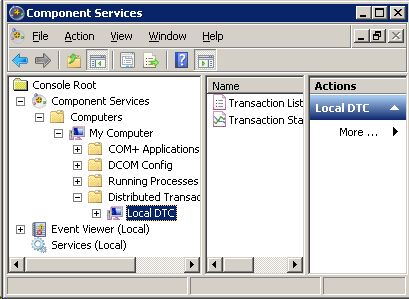
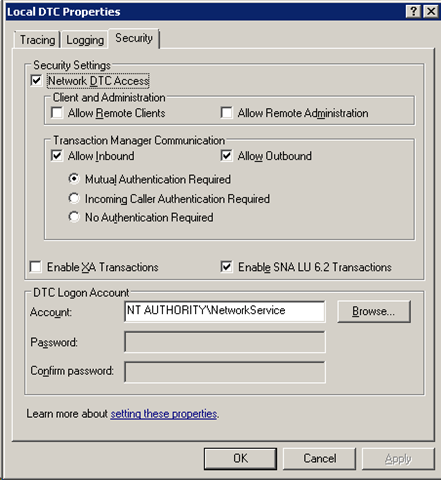
How to enable Network DTC Access on Windows 7

This confused me for a bit, they’ve moved the Network DTC Access dialog from the MSDTC tab to its own node…

image

Select properties on the above node…

image

Silverlight control lifecycle

Just happended across this post and thought it would be good to keep it referenced;