IE6 (ah bless) is oddly paranoid when rendering https sites. This can be seen when it attempts to use a page that contains a Silverlight application. The problem stems from the default template Visual Studio generates for hosting the application. It contains a invisible iFrame element, apparently to support Safari. However, if you attempt follow the links to explain why Safari needs such a hack you hit a dead-end. Assuming that was because Safari 4 has since been released I tested the previous problem, that you can’t correctly browser-back to a page with SL content. It seems to work fine. However, Ken Tucker pointed out that Silverlight Navigation now requires the use of this iFrame. So the simplest solutions is to add a src="#’ attribute to the iFrame – this doesn’t seem to cause any problems to "modern" browsers and IE6 now understands that the src is secure.
Silverlight
Using Blend to set the colour of the text in a button
Silverlight & Blend try and encourage you to separate styles and structure in much the same way as you should with HTML and CSS. However, Blend can be confusing as it will offer up some properties to be changed but “hide” others. One example of this is the seemingly simple task of changing the colour of the text in a button. You’d be forgiven for thinking you can select the button and directly edit the foreground colour since the background is available. You must ignore this temptation, if you don’t attempt to make style changes directly to the structure (control) then you’ll avoid a lot of confusion. I’ve created a little tutorial to show one way of solving this;
- Create a new project in Blend and accept the defaults.

- Add a button

- Select the button, hint using the control tree is often more reliable, right-click and choose Edit Templatate->Edit a Copy. To promote separation I recommend saving the style to the Application. You should give the style a good name, but I’ll be naughty and leave it at ButtonStyle1
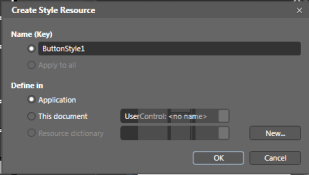
- You’ll now find yourself in the Template for the button. Ignore this and return the MainPage.xaml (there is a quicker way but lets keep things simple). Now you want to change the colour of the button, so you need to edit the buttons style. Select the Resources tab and click the button to edit ButtonStyle1

- Now switch back to the Properties tab and you can change the Foreground (remember to drag the little colour select from the bottom left of the selector).

- All done.


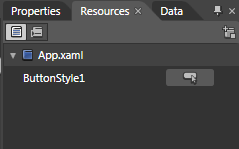
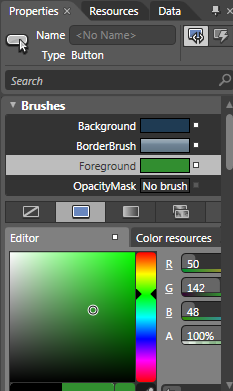
So the “take home” from this is don’t make style changes directly to your controls always look at changing the separate style xaml, not only will you have better separation but you’ll avoid a lot of frustration when trying to find the property you want to change.
Update Service Reference not working?
The integration provided by Visual Studio between Silverlight and and WCF Service is good but can be frustrating. Here are a couple of simple things to try when things don’t appear to be working;
1. I’ve created/changed my service but when I update the reference or attempt to discover the new sevice it can’t be found – make sure the service has built by rebuilding the service
2. I’ve changed the service and ran ‘update the service reference’ but my Silverlight code cannot see the changes, in fact it seems to have lost all references to the proxy code – rebuild (not compile) the Silverlight project.
Passing Exceptions from WCF to Silverlight
After upgrading a Silverlight project to 3 I wondered if the story about passing exceptions from WCF to SL had changed. Previously, because WCF sends fault messages as 500 response codes SL could not see them. However, although I believe this is still true I spotted, Creating and Handling Faults in Silverlight, which explains how to change the end-point behaviour to return faults as 200 codes and therefore suddenly allowing Silverlight to see them. I did have a few teething problems with, mainly to do with me misreading the config soup. One quick gotcha is to remember to refresh your service reference so you can see the new exception, I mean fault, classes.
Database for Silverlight
Another quick bookmark of a blog that talks about an open source database project that could be ideal for Silverlight out-of-browser applications
Online Visual Studio like IDE
Just discovered Code Run which is basically a Visual Studio clone that runs online, even has Silverlight projects.
Cross domain specification
Quick post so I don’t lose it, Cross-domain policy file specification
Cross Domain Policy file gotcha on a development environment
I hit a little gotcha today when using Silverlight to talk to a Service. My solution has a separate web and wcf projects. So, without thinking, it didn’t suprise me that the Silverlight app running in the web site moaned about security when trying to talk to the service (http://projects.nikhilk.net/WebDevHelper is a great add-in for IE if you want to inspect the http requests on a development machine). So I placed a clientaccesspolicy.xml in the service and everything worked fine. Later it struck me that in this instance (for various reasons) the service should actually exist in the web site rather than a separate project. So I moved the service over and didn’t bother to move the policy file, after all I will no longer be going cross-domain. So I was initially puzzled as to why I was getting the security faults again. The problem stems from my use of a virtual directory on my dev machine. So my web site is at something like; myBox.myCompany.com/devSite/default.aspx. However, when Silverlight looks for the domain policy it looks for at the root of the domain so; myBox.myCompany.com and unsurprisingly it cannot find the policy file there. So I just had to copy the file to the root of default site and everything was fine.
How to add a Silverlight project to an existing Web Project
Whenever you play with Silverlight via Visual Studio you soon learn about the link between the Silverlight application and the web site’s ClientBin folder. However, what happens if you already have a web site project and want to add a new (or existing) Silverlight project to it? Well you either manually copy the xap over after every build (no thanks) or just go the web site’s properties and select the Silverlight tab and add your project to it. Easy…I hope that’s not tempting fate.
How to remove items from a bound list box or how to avoid “Operation not supported on read-only collection.”
Today I got a rude error message from my application when I attempted to do a very simple operation, that of removing an item from ListBox; "Operation not supported on read-only collection."
The problem stems from the fact that I’d bound my ListBox to an ObservableCollection, once bound the Items collection becomes read-only. A know some others have had the same problem so I thought I’d blog about my solution. Utilizing a function, I’d previously blogged about, to find the ListBoxItem from a button click I then do a little casting and the item is removed;
private void buttonDelete_Click(object sender, RoutedEventArgs e)
{
ListBoxItem selectedItem = FindAssociatedListBoxItem(sender);
// if we have found an item then remove it
if (selectedItem != null)
{
MyColl myColl = this.ListBoxProducts.ItemsSource as MyColl;
MyObject selectedObj = selectedItem.DataContext as MyObject;
myColl.Remove(selectedObj);
}
}
 IT Bytes