Improvement to Language Detect in MS Translation API

One service that is used a lot in Bot development is the Microsoft Translation API. One method is especially useful; detect.

In v2 you would make a call like Detect(“Hello”) and it would return “en”. Fine, actually it’s not. If your Bot was speaking in German and the User entered “Ja” then Detect(“Ja”) would return “Finnish” – noooooh. Thankfully v3 now provides us with the alternatives, as you can see here they all have the same score – Hurray 🙂

[
    {
        "language": "fi",
        "score": 1,
        "isTranslationSupported": true,
        "isTransliterationSupported": false,
        "alternatives": [
            {
                "language": "et",
                "score": 1,
                "isTranslationSupported": true,
                "isTransliterationSupported": false
            },
            {
                "language": "de",
                "score": 1,
                "isTranslationSupported": true,
                "isTransliterationSupported": false
            }
        ]
    }
]

Waterfallstep patterns in Bot Framework

The Waterfallstep is a crucial part of the v4 Bot Framework. When you review the samples there are two basic patterns;

Lambda style

The usual advantages apply, but mainly; reduces ‘unnecessary’ code and everything is one place.

dialogs.Add("reserveTable", new WaterfallStep[]
{
async (dc, args, next) =>
{
// Prompt for the guest's name.
await dc.Context.SendActivity("Welcome to the reservation service.");
dc.ActiveDialog.State = new Dictionary();

await dc.Prompt("dateTimePrompt", "Please provide a reservation date and time.");
},
async(dc, args, next) =>
{
var dateTimeResult = ((DateTimeResult)args).Resolution.First();

dc.ActiveDialog.State["date"] = Convert.ToDateTime(dateTimeResult.Value);

// Ask for next info
await dc.Prompt("partySizePrompt", "How many people are in your party?");

},

...

Step as Function style

Requires more writing but also has it’s advantages; easier to read the intent of the flow (especially for complex step logic) and easier to re-use steps (e.g. asking for a name).

 var waterfallSteps = new WaterfallStep[]
   {
           PromptForNameStepAsync,
           PromptForCityStepAsync,
           DisplayGreetingStateStepAsync,
   };

State In Step Pattern

Previously in State Handling I wrote about the v4 state pattern that initializes state in the setup phase of the Bot. However, as your Bot increases in complexity you should consider using a State-In-Step initialize step. E.g. changing the above example to (taken from Bot Samples);

 var waterfallSteps = new WaterfallStep[]
   {
           InitializeStateStepAsync
           PromptForNameStepAsync,
           PromptForCityStepAsync,
           DisplayGreetingStateStepAsync,
   };

public IStatePropertyAccessor GreetingStateAccessor { get; }

private async Task InitializeStateStepAsync(WaterfallStepContext stepContext, CancellationToken cancellationToken)
{
    var greetingState = await GreetingStateAccessor.GetAsync(stepContext.Context, () => null);
    if (greetingState == null)
    {
        var greetingStateOpt = stepContext.Options as GreetingState;
        if (greetingStateOpt != null)
        {
            await GreetingStateAccessor.SetAsync(stepContext.Context, greetingStateOpt);
        }
        else
        {
            await GreetingStateAccessor.SetAsync(stepContext.Context, new GreetingState());
        }
    }

    return await stepContext.NextAsync();
}

I think I would still move that into a separate Accessor class but the step pattern keeps the responsibility clearly defined.

Ultimately the choice is yours, but for a reasonably complex Bot I would suggest using the Step-As-Function combined with the State-In-Step patterns.
 

Basic Life-cycle changes between Bot Framework v3 and v4

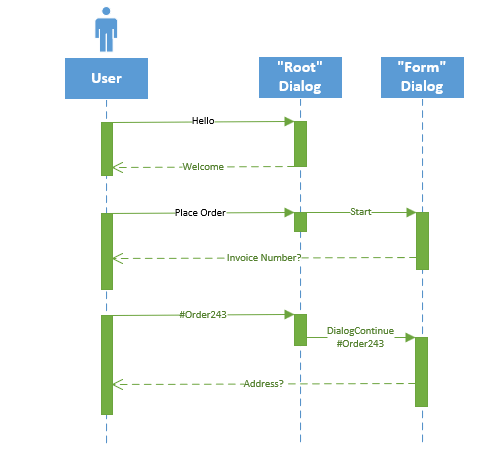
Changes between v3 & v4 of the Bot Framework are often subtle but important. One area is the basic life cycle of a conversation. For example, in v3 the life cycle looks something like this;
v3bot.PNG

The user types in “Hello” and that goes via a Web Controller and onto a default dialog. In this example the dialog replies with, “Welcome”. One thing that immediately looks odd is that the return message from the dialog does NOT go via the calling Web Controller. In this example a Direct Line invocation is made to send the “Welcome” message directly to the user’s client. However, the controller is still waiting, so its ‘activation time’ is still the total time for the response to be constructed. Things also get a little confusing when a specialized dialog is used, e.g. when placing an order. The initial sequence is the same, the root dialog invokes the specialized form dialog and it’s the form dialog that responds with the message to the user, again directly. However, now when the user responds, the root dialog will (almost) invisibly pass on the next user message directly to the active form dialog. This continues until the specialized dialog completes and the stack returns to the root dialogs control.

V4 hides some of this slightly confusing plumbing from us;

v4bot.PNG

V4 hides away the Web Controller, so already the sequence (and code) is easier to follow. In my view, the real change is that now everything is very clearly funneled through the root dialog. Even when the specialized form dialog is active the control still obviously flows through the root. The root dialog does not have to do anything particularly clever for the sequence to work, it merely calls DialogContinue on the context. But now you can add code, breakpoints, etc. in the root and it is clear they will be hit. BTW. if you want to write some type of always-invoked-intercept code then you would use the middleware mechanisms in v4 rather than bloating the root dialog.

So yes it’s a subtle change, but I think it is an improvement.


Changes to handling state from V3 to V4 of the Bot Framework

One of the crucial areas for a Bot development is how to handle state, v4 has a new approach to it

V3 State Handling

Probably the easiest way to access state data is from the context object, or more specifically the IBotData aspect of IDialogContext. This provides access to the three main state bags; Conversation, Private Conversation and User.

context.PrivateConversationData.SetValue("SomeBooleanState", true);

If you do not have access to the context then you can load the state directly from the store. The implementation of the store is left open, this example is using a CosmoDB store;

 var stateStore = new CosmosDbBotDataStore(uri, key, storeTypes: types);

 builder.Register(c => store)
        .Keyed(AzureModule.Key_DataStore)
        .AsSelf()
        .SingleInstance();

IBotDataStore botStateDataStore;
...
var address = new Address(activity.From.Id, activity.ChannelId, activity.Recipient.Id, activity.Conversation.Id, activity.ServiceUrl);
var botState = await botStateDataStore.LoadAsync(address, BotStoreType.BotPrivateConversationData, CancellationToken.None);

It’s an okay solution, but v4 decided to go in a slightly different direction.

V4 State Handling

v4 encourages us to be more upfront about what our state looks like rather than simply hiding it in property bags. Start off by creating a class to hold the state properties you want to access. This requires using IStatePropertyAccessor

public IStatePropertyAccessor FavouriteColourChoice { get; set; }

At practically the earliest point of the life-cycle, configure the state in the startup;

public void ConfigureServices(IServiceCollection services)
{
   services.AddBot(options =>
   {
...

// Provide a 'persistent' store implementation
IStorage dataStore = new MemoryStorage();

// Register which of the 3 store types we want to use
var privateState = new PrivateConversationState(dataStore);
options.State.Add(privateState);

var conversationState = new ConversationState(dataStore);
options.State.Add(conversationState);

var userState = new UserState(dataStore);
options.State.Add(userState);
...

Now for the real v4 change. On each execution of the bot, or ‘Turn’, we register the specialized state that we are going to expose;

// Create and register state accesssors.
// Acessors created here are passed into the IBot-derived class on every turn.
services.AddSingleton(sp =>
{
// get the options we've just defined from the configured services
var options =
    sp.GetRequiredService<IOptions>().Value;
...

// get the state types we registered
var privateConversationState =
    options.State.OfType(PrivateConversationState).First();

var conversationState = options.State.OfType(ConversationState).First();

var userState = options.State.OfType(UserState).First();

// now expose our specialized state via an 'StateAccessor'
var accessors = new MySpecialisedStateAccessors(
                privateConversationState,
                conversationState,
                userState)
{
FavouriteColourChoice = userState.CreateProperty("BestColour"),
MyDialogState = conversationState.CreateProperty("DialogState"),
...
};

The state accessor is then made available to each Turn via the constructor;

public MainBotFeature(MyUserStateAccessors statePropertyAccessor)
{
     _userStateAccessors = statePropertyAccessor;
}
...
public async Task OnTurnAsync(ITurnContext turnContext,
                  CancellationToken cancellationToken =
                    default(CancellationToken))
{
...
var favouriteColour = await _userStateAccessors.FavouriteColourChoice.GetAsync(
                      turnContext,
                      () => FavouriteColour.None);
...
// Set the property using the accessor.
await _userStateAccessors.CounterState.SetAsync(
                          turnContext,
                          favouriteColourChangedState);

// Save the new turn count into the user state.
await _userStateAccessors.UserState.SaveChangesAsync(turnContext);
...

Migrating data

If you are already running a v3 Bot then migrating state data will depend on how you implemented your persistent state store, which is a good thing. It’s still basically a property bag under the covers so with a little bit of testing you should be able to migrate without too many issues – should 😉

Also you can now watch

Bot Framework Dialogs and Non accessor state

Tip to improving your LUIS with Entities model

When creating an Intent that includes Entities, especially personName, then you may have to increase the number of utterances to achieve a match with a high confidence score. However, try to avoid using the specific test as your utterance. For example;

Consider the Intent, ‘WhenIsTheirBirthday’. You might provide utterances such as, ‘When is Jane’s Birthday’, ‘When is Bert’s Birthday’, etc. When you Test the phrases you might find a test that only results in a very low confidence score, e.g. ‘When is Tim’s Birthday’. Don’t be tempted to add that as an utterance, if you do you will be providing very specific training and you cannot be certain that your are really improving the model. In that example, you would just add some more utterances that are similar, but not the same, and re-train. Keep doing that and you should see, ‘When is Tim’s Birthday’ confidence start to rise until it goes above your required confidence level.

Testing Events in the Bot Framework Emulator

The Bot Framework emulator is great at testing basic message events, which probably represents the majority of the work. It also supports a few additional ‘system events’ namely; conversation updates, contact updates, ping, typing, delete user data. All good news. However, there is nothing stopping the Bot from supporting all sorts of other events. For example, perhaps the host system wants to invoke a language change, request a transcript, etc. The emulator isn’t so great at supporting these. My quick solution was to write a console app that will send any message, including events, to your Bot site.

static void Main(string[] args)
{
    /*
        hostAddress:=
        conversationId:=
        authToken:=

        Example of a message type
        json:={\"type\":\"message\",\"text\":\"look\",\"from\":{\"id\":\"default-user\",\"name\":\"User\"},\"locale\":\"en-US\",\"textFormat\":\"plain\",\"timestamp\":\"2018-10-08T08:39:19.622Z\",\"channelData\":{}}

        Example of an event type
        json:={\"from\":{\"id\":\"SomeId\",\"name\":\"Paulio\"},\"type\":\"event\",\"name\":\"MyCommand\",\"value\":{\"command\":\"ResetFlags\"}}
    */

    var commands = CommandsFromArgs(args);

    string botEndpoint, authorizationHeader, method, contentType;
    byte[] body;
    ParseCommands(commands, out botEndpoint, out authorizationHeader, out method, out contentType, out body);

    var webClient = new WebClient();
    webClient.Headers.Add("Authorization", authorizationHeader);
    webClient.Headers.Add("Content-Type", contentType);
    var result = webClient.UploadData(botEndpoint, method, body);

    var response = Encoding.ASCII.GetString(result);
}

private static void ParseCommands(Dictionary commands, out string botEndpoint, out string authorizationHeader, out string method, out string contentType, out byte[] body)
{
    var botHostAddress = commands["hostAddress"];
    var conversationId = commands["conversationId"];
    botEndpoint = $"{botHostAddress}/v3/directline/conversations/{conversationId}%7Clivechat/activities";
    var authToken = commands["authToken"];
    authorizationHeader = $"Bearer {authToken}";
    method = "POST";
    contentType = "application/json";
    var requestBody = commands["json"];
    body = Encoding.ASCII.GetBytes(requestBody);
}

private static Dictionary CommandsFromArgs(string[] args)
{
    var commands = new Dictionary();
    var splitter = new string[] { ":=" };
    foreach (var arg in args)
    {
        if (arg.Contains(":="))
        {
            var pair = arg.Split(splitter, StringSplitOptions.None);
            if (pair.Length == 2)
            {
                commands.Add(pair[0], pair[1]);
            }
        }
    }

    return commands;
}

To invoke the sender you must supply;

  1. hostAddress – the Service URL address of your dev or actual site. This is a property of an Activity
  2. conversationId – the id of the conversation, you can see this by setting a break point in your code, although it’s a good idea to get your Bot to have a diagnostic message/command so it will display this for you
  3. authToken- another one you’ll need to glean from your code or diagnostics
  4. json – the payload you wish to send to the Bot. In the code you can see two examples, one is a basic message activity, the other is an event.

Hope this helps.

LUIS now understands people’s names

This one managed to slip past me, but recently Microsoft Language Understand Intelligent Service (LUIS) has been updated with a pre-built entity to match people’s names. Seems like an obvious requirement but is pretty tricky to implement. To match people’s names;

  1. Open your KB in the LUIS UI of your choice
  2. Go to the Entity menu
  3. select Add Prebuilt entity
  4. choose personName

Now you can create an Intent such as “Call” with “Call Jane” and “Jane” will be matched to personName. So far (and testing is difficult) I’ve thrown all my usual problematic name variants (Western, Nordic, Chinese, Indian) and it’s managed them all, even “Call peter phoxterd-hemmington-smythe” 🙂

Gotcha with Skype, Bot Framework and LUIS

I hit a very annoying problem today with one of my Bots. It uses LUIS to react to the intent of what the user is saying. Two of the intents are “Weather” and “HowAreYou”. I’d run through the emulator and all the flows were working well. The user says something like;

  • “What’s up?” and the Bot responds with, “Ok, thanks how are you?”
  • “What’s the weather like?”, you receive, “lovely and sunny”

I published to Skype and suddenly the flows were broken.

  • “What’s up?” – “Cold today, brrrr”
  • “What’s the weather like?” – “lovely and sunny”

Why has that broken? Well the problem is that when Skype sends a request it is NOT sending the text in plain, it’s HTML encoding it. So rather than LUIS receiving "What's up?" it’s actually receiving, "what&pos;s up". This is then mapped to the Weather intent rather than “HowAreYou”. This is frustrating because the LUIS support is via a Middleware service and I haven’t found an option that allows me to tell it to decode the in-bound text. So my solution is to place a decoder in the Middleware pipe *before* the LUIS Middleware;

 public class HtmlDecoderMiddleware : IMiddleware
    {
        public async Task OnTurn(ITurnContext context, MiddlewareSet.NextDelegate next)
        {
            var text = context.Activity.Text;
            context.Activity.Text = WebUtility.HtmlDecode(text);
            await next();
        }
    }

Handling flow from Prompt Validators

Edit – warning this is about pre-release v4. Whilst it’s similar to the final release it’s not the same

Creating a basic flow with Botframework V4 is pretty straightforward. You define your steps and any other dialogs or prompts that you may wish to use. For example, consider this basic name capturing definition;

Add(Inputs.Text, new Microsoft.Bot.Builder.Dialogs.TextPrompt(TextValidator));
Add(Name, new WaterfallStep[]
{
    // Each step takes in a dialog context, arguments, and the next delegate.
    async (dc, args, next) =>
    {
        // Prompt for the user's first name.
        await dc.Prompt(Inputs.Text, "Hey, what's your first name?");
    },
    async (dc, args, next) =>
    {
        dc.ActiveDialog.State["1stName"] = args["Text"].ToString();

        // Prompt for the user's second name.
        await dc.Prompt(Inputs.Text, "what's your second name?");
    },
...
private Task TextValidator(ITurnContext context, TextResult toValidate)
{
    if (toValidate.Text == ".")
    {
        toValidate.Status = null;

    }

    return Task.CompletedTask;
}

The above code will reject the second name if the user types in a full-stop. But what will happen next needs to be considered. The current code will correctly reject the full-stop but it will restart the dialog and ask the user for their first name again. There are a couple of ways to handle this, and they can be implemented in unison.

Use a Retry Message

When a prompt has a Retry-Message associated with it then any failure from the Validator will keep the user on the same waterfall step.

...
 async (dc, args, next) =>
    {
        dc.ActiveDialog.State["1stName"] = args["Text"].ToString();
        // Prompt for the user's second name.
        await dc.Prompt(Inputs.Text, "what's your second name?",
            new PromptOptions
            {
                RetryPromptString = "what's your really your second name?"
            });
    },
...

The above code is probably all your need, but you may also want to equip your waterfall steps to be more…re-entrant.

Replay dialog

This is particularly useful if you provide a way to edit the user’s choices. The idea is that each step examines its arguments or state and if already fulfilled simply passes the flow onto the next step. In the final step you decide if everything has completed or if the flow should start again.
Example step;

async (dc, args, next) =>
    {
        if (args.ContainsKey("1stStep")
        {
          await next(args);
        }
        else
        {
          // Prompt for the user's first name.
          await dc.Prompt(Inputs.Text, "Hey, what's your first name?");
        }
    },
...

Final step;

async (dc, args, next) =>
    {
        if (AllConditionsMet(args))
        {
          // finish the dialog
          await dc.End(dc.ActiveDialog.State);
        }
        else
        {
          // replay the flow
          await dc.Replace("yourdialogName", dc.ActiveDialog.State);
        }
    },

Combining Retry and Replay

There is nothing stopping you using a combination of the methods. If you want to enable an editing scenario but want the framework to ensure a criteria is met for specific steps then just implement both.

Matching names in LUIS

I recently hit a thorny issue with allowing my Bot to understand names via LUIS. I tried to train the LUIS model with various utterances of, ‘how is ‘ but it really wasn’t getting anywhere. There are just so many variations of names that unless I retrieved a large name data set then this really wasn’t going to work. So I fell back to using a very specific match. Yes, that is not really in the spirit of LUIS but at least it keeps all the language models in one place. My trick is pretty simple;

  • Create your Intent; e.g. HowIs
  • Add your *specific* utterance; e.g. how is paul
  • Go to the Entities options and create a new Entity called ‘Name’…
  • Set the Entity Type to RegEx…
  • Add your RegEx, e.g. (?<=^.{7})(.*)
  • Hit train
  • Now when you visit your Intent you should see the name aspect labelled as ‘Name’. As I say, it’s pretty crude and frankly you don’t need LUIS to do such a match. But if you believe there is value in keeping all your language matching models in the same place then it’s the best solution I currently have.

    NB I tried using a training list and Pattern and neither seemed to help