Using Sketchflow to prototype MonoTouch application

I wanted to see how tricky it would be to use Sketchflow to prototype a iPhone application. I think it’s worthy of a proper tutorial but for now I’ll give a quick pass since 1/2 the battle is just knowing it’s possible.

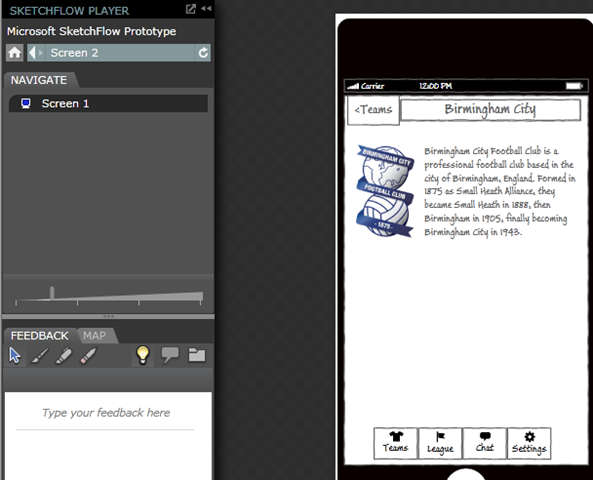
The first thing I needed was a template for an iPhone, I found one I liked at http://anoriginalidea.wordpress.com/category/sketchflow/. I made this into a User Control and then into a Screen Component (all via single right-clicks). With a couple of grids you can create the basic table view controller layout. Running with the seemingly accepted mono touch community theme of football RSS feeds I created the layout you see below. What you can see is the iPhone control as the background, a simple textbox for the view title, a databound list box pretending to be a table view controller and a stack panel of buttons playing the role of tab controller.
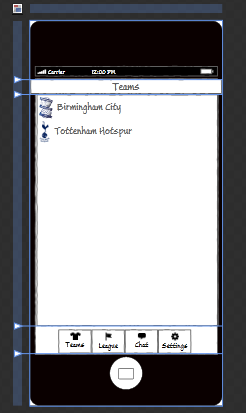
imageimageimage

One of the important aspects of using SketchFlow is to create the navigation and state changes to allow your customers to see what is likely to happen. In my example (forgive the names) I’ve created Screen 1 (the table navigation view) which links to Screen 2 (the detail view). Looking at the screenshots does usually help but with the additional SketchFlow map you can see that there are blue navigation flows between the two. You can also see that I’m reusing two assets on both screens, namely the iPhone and tab components.

So I’ve created a design in SketchFlow, now what? How do I get feedback on this, how do I pass this onto to designers and developers? One way is to use the Export to Word option that creates a nice document for people to get their red pens out and dual over.

image

But this is all very stale, the real advantage is to create an interactive player that you can send out to your customers (WPF) or host on a web site (Silverlight). This allows for annotations & graphical feedback together with a simple way to navigate between the screens and states.
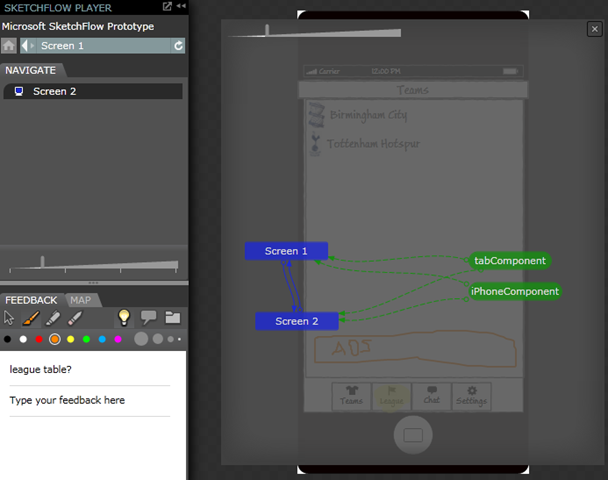
image 

However, with the use of a few behaviours you can get the buttons and UI to execute the transitions by pressing them, far more intuitive and with little effort. I can’t really show that here, trust me the buttons highlight and and click through…
image

If there is enough interest I’ll write a tutorial and publish the source, but hopefully there is enough here to pique someone’s interest in using SketchFlow with MonoTouch. Now if MonoTouch represented the UI as XAML…

Creating a very simple MonoTouch application without the Interface Builder

Creating a very simple MonoTouch application without the Interface Builder

I admit that I’m not a big fan of the Interface Builder (IB). I find that it either hides what I need to know or fails to help me implement what I what via a GUI. So I’ve decided to take a leaf from Craig Dunn (http://conceptdev.blogspot.com/search/label/monotouch) and avoid some of the hidden magic from IB and manually build some of the controls. However, there isn’t an empty iPhone project so I thought I’d write a quick blog to help me remember what I need to do.

Create a new project

First off create a new project, this will generate the usual set of files, so the next step is to get rid of those of IB files
image

Clean the project

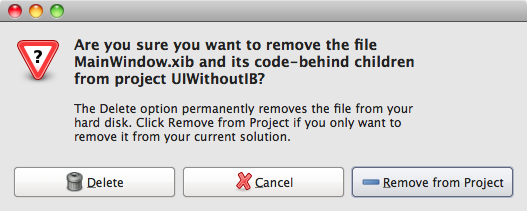
Delete MainWindow.xib

image

Add AppDelegate.cs

I like Craig’s clean solution, so do as the man says and add a new class (File->New) AppDelegate

image

and add the following code snippet;
using System;
using MonoTouch.Foundation;
using MonoTouch.UIKit;

namespace UIWithoutIB
{

    [Register ("AppDelegate")]
    public class AppDelegate : UIApplicationDelegate
    {
        UIWindow window;
     public override bool FinishedLaunching (UIApplication app, NSDictionary options)
        {
            // Create the main window and add the navigation controller as a subview
            window = new UIWindow (UIScreen.MainScreen.Bounds);
            window.MakeKeyAndVisible ();
            return true;
        }
        // This method is allegedly required in iPhoneOS 3.0
        public override void OnActivated (UIApplication application)
        {
        }
    }
}

Change Main to use only AppDelegate.cs

Remove the partial class used to implement the Application Delegate from Main.cs. Main should look like;
using System;
using MonoTouch.Foundation;
using MonoTouch.UIKit;

namespace UIWithoutIB
{
    public class Application
    {
        static void Main (string[] args)
        {
            // UIApplication.Main (args); See blog comments from Philippe Laybaert….

            UIApplication.Main (args,null,"AppDelegate");

        }
    }
}

Prevent, Failed to load NSMainNibFile MainWindow

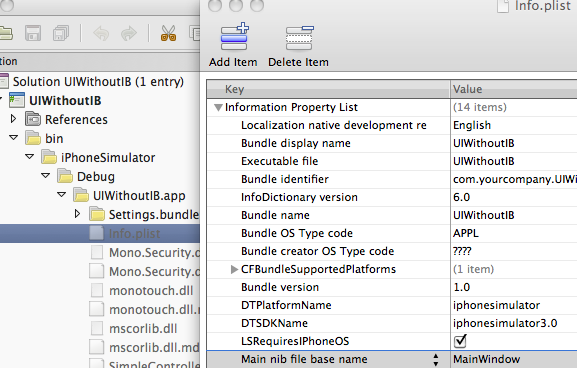
Ok so we’re in the land of Cocoa and we should play nice and say what our Main Window is. But hey I don’t want to, so if you build now you’ll get a strange message, ‘Failed to load NSMainNibFile MainWindow’. The template did a good job and created a MainWindow and filled in some extra “project” details. Since we no longer have MainWindow we should correct this. So make sure you have set your display options to Show all files, and navigate down the bin folders to the info.plist file. Open that and delete the ‘Main nib file base name’ setting.

image

Load our views

Change the App Delegate to add our views (and controller), or in this case a label control. Change the FinishedLaunching override to;
public override bool FinishedLaunching (UIApplication app, NSDictionary options)
        {   
            // Create the main window and add the navigation controller as a subview
            window = new UIWindow (UIScreen.MainScreen.Bounds);
         UILabel purpleLabel = new UILabel();
         purpleLabel.BackgroundColor = UIColor.Purple;
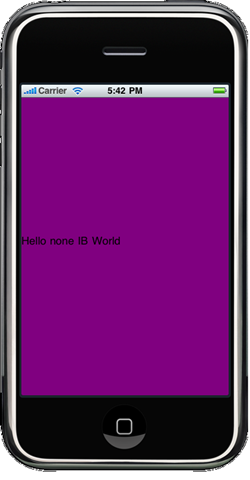
         purpleLabel.Text = "Hello none IB World";
         purpleLabel.Frame = window.Frame;
         window.AddSubview(purpleLabel);
            window.MakeKeyAndVisible ();
            return true;
        }

Run the app

imageSo from here we can add other view-controllers without having to use IB. Having said that, I still use IB to create the odd view, and you can still use those controllers with this method.
A quick note about troubleshooting, I’ve found that if you’ve built with a IB file (xib) you later delete it’s worth asking for a Build->Clean, Build->Rebuild.

Sharing a single bin folder across multiple sites

During development it’s often useful to have multiple sites (and other app domains) using the same bin folder even if they are located in different locations. My preferred mechanism is to use a directory junction.

E.g. you have a bin folder;

C:\MyTests\bin

…and some projects

C:\web\test1

C:\web\test2

C:\winApp\test3

Open command prompt and navigate to each of the project folders and issue the following command (make sure there isn’t already a bin folder in those locations);

mklink /J bin C:\MyTests\bin

…it should display;

Junction created for bin <<===>> C:\web\test1\bin

…there, when the app domains run they’ll look (probe) for the code in the locale bin folder which in reality lives at C:\MyTests\bin. So you can now update a DLL once it will be reflected in all your tests locations. Obviously this my increase your file locking headache but you takes your choice.

How to: Use different views with a PageControl in MonoTouch

I’ve just started down the rocky road of iPhone development via MonoTouch. I suspect like many .net developers I’ve found the iPhone thang can be downright weird. One of the bloggers I’ve found helpful is Simon Says. One such post explains how to create a PageControl, http://simon.nureality.ca/?p=135. You know, that series of dots at the bottom of an iPhone view that allows you to move between pages of information. Although the post is great one thing still puzzled me, how do I shows pages of different views, i.e. if this was WinForms how would I can create different forms (Views) and show them as different pages? So first off, follow Simon’s post and get to the point where you should now have 10 pages each showing a label then;

NB. I’m no expert at this, if you know a better way to do something (or just spot a mistake) please let me know.

1. How do I get the PageControl to move between the pages?

Simon’s post allows you to ‘flick’ your way through the views and the PageControl reflects the changes, however if the user flicks the PageControl nothing happens.

In CreatePanel add the following event handler;

pageControl.TouchUpInside += HandlePageControlTouchUpInside;

void HandlePageControlTouchUpInside (object sender, EventArgs e)
        {
            // big assumption: the user moves the page control and after the control has set the current page this event is fired
            RectangleF toRect = new RectangleF(scrollView.Frame.Width * pageControl.CurrentPage, scrollView.Frame.Y, scrollView.Frame.Width, scrollView.Frame.Height);
            scrollView.ScrollRectToVisible(toRect, true);       
        }

2. Having 10 repeated Labels as Views is nice, but how do I use a mixture of my views I’ve created in the Interface Builder?

I recommend that for every different Form/View you want to display create a ViewController via File->New File->View with Definition Controller. In my example I created a controller called BertController.

Open the xib file in the Interface Builder (IB). You can drop whatever UI widgets onto the View, but for now let’s start by dropping a UILabel. In the weird world of imageiPhone development you need to create field to represent the UI element by creating an outlet, so in the Library viewer make sure the class representing the controller is selected (in my case BertController) and select the outlet tab. Create a new outlet to represent the label called, myLabel (or a much better name). Make sure the File Owner is selected and view the connection inspector’s outlet tab. Drag the name of you outlet to the label control. I know, it’s weird but you get used to it (so they tell me). Save and quit IB. Now we have something much more like our familiar forms class. So let’s expose the label control to the outside world (yes it’s bad practice but hey it wouldn’t be a tutorial without it). Open your controllers cs file (BertController.xib.cs) and add a property to it;


public UILabel MyLabel {
            get
            {
                return this.myLabel;   
            }
        }

See just like a normal form 😉

Now we have a view controller like our beloved form class we need to add it to the pages. Revisit CreatePanels in main and comment out all the for-loop and add the following function;

void AddView (string label)
        {
            RectangleF lastFrame = scrollView.Frame;
            PointF lastLocation = new PointF();
            lastLocation.X = lastFrame.Width * scrollView.Subviews.Count();
            lastFrame.Location = lastLocation;
            BertController controller = new BertController();
            controller.View.Frame = lastFrame;
            controller.MyLabel.Text = label;
            scrollView.AddSubview(controller.View);
        }

Pages on the iPhone are a series of frame-sized ‘views’. So to create them you need to know where in the virtual frame-set to add them. I think I’ve got the maths right, so if you use the function it should append a new BertController to the set. So add the following to CreatePanels;

AddView ("Well hello there 1");
AddView ("Well hello there 2");

imageThere you have it, two of our views/forms all handled by the PageControl. So if you wanted to add different Forms create a new View Controller and add the controllers view. Hope it helps.

How to install Snow Leopard on Tiger (when it won’t read the DVD)

This post is in three sections; a sorry story of my adventures in upgrading from OSX Tiger to Snow Leopard, my thoughts about the why it happened and probably the useful bit – how I solved the problem, I’ll do this section first. So if you don’t care about my thoughts on the matter then just read the how-to.

How to install Snow Leopard on Tiger when it refuses to read the install DVD

My old Macbook (white Intel) does not like the Snow Leopard DVD. It either spits it out or fails complaining about “bad download” or “file missing” or other read DSC02068failures that essentially mean you can’t use it. It also means you can’t create a bootable USB drive cause it won’t read the DVD to copy all the files off it. Don’t waste you time, face it if the DVD is in the slot loader drive it is not going to work. Don’t bother with CD/DVD sharing either, Tiger doesn’t play as client. Here is my solution, basically get an external DVD drive. In my case I raided my PC hardware tools and dug out my emergency hard disk reader kit. A little device that plugs onto a Hard Disk and turns it into a USB drive. I then took a DVD drive from my ageing Dell and connected it to my Mac via the USB converter. That was it, worked like a charm. I did use it to create a USB drive (via the Disk Utility/Mac journal format/Restore) to continue the install process as I thought it would be convenient to have OSX Install on flash rather than drag my repair kit out.

I’ve a included a picture of my hi-tech setup, hopefully you can see the SATA/IDE to USB converter (complete with power too), my glowing USB stick with OSX now on it and my poor old Macbook getting Slow Leonard put on it.


Upgrading Tiger – a story of frustration

Ok so I’m a developer with a keen interest in developing Mobile applications well more PDA than phone but still. I wanted to write for the iPhone/iTouch as so joined the Apple Developer group, downloaded iPhone SDK beta and started to wrestle with, IMO, the disgustingly ancient Objective C. Then Leopard and the iPhone SDK were released but strangely I could no longer install onto Tiger, no, no I had to buy Leopard – (Apple –1 point)  . Well stubbornly I refused given that I’d heard the rumours of our Snow friend. When Snow Leopard (SL) was released they wanted £130 to upgrade from Tiger – ha (Apple –2 points). Finally my days in the wilderness ended when I was made aware of Amazon selling the full Snow Leopard for £20. I carefully checked the title and text and no mention of upgrade – ok I’ll do it for £20. Only when the disc turned up and I double checked the machine requirements did it say it required Leopard to be installed – argh it’s an upgrade in disguise. Amazon gave me the money back but assured me the details were those written by Apple (Apple –3 points). Fortunately (debatable)  Amazon then started selling the full box set for £90, ok my appetite whet from so nearly having iPhone development I paid up.

It turned up, so I dutifully spent my Saturday morning backing anything I thought was 1/2 useful and put the fresh DVD into the Macbook slot loader. Brrz, brzzz [auto eject]. Hmm, didn’t sound good. Try again, more noises then nothing. No DVD drive showing. Manual eject and try again. 3rd time lucky the install dialog pops up. Ok restart…spinning wheel…spinning wheel…no sound…turn machine off. Went through the process again. Finally after restarting the ‘select language’ dialog pops up, off we go. Progress bar makes it about 1/5 of the way – error bad download. Successive attempts all fail at roughly the same place with various read errors. Brilliant. Apple Support is fully of stories about CD/DVD sharing to remote install on Macbook Air/Mini, but nothing about Tiger (Apple –4 points). After many attempts at sharing via Windows 7, XP, etc I finally realised that Tiger was not going to see these shared drives. A normal network share doesn’t work either cause there is a Windows partition on the DVD so Windows effectively hides the install files from the Mac. I tried to used a Mac file reader for the Windows, grabbed the files and created an iso image. No go, when trying to use the Disk Utility to ‘restore’ it kept saying I needed to authenticate – which it turns out actually means invalid/corrupted file image (Apple –5 points). Oh this is hopeless I’m going to need Firewire access to another mac. I know I’ll call support and get their advice, closed on Sundays (Apple –6 points). I phoned the Apple Retail store – put on endless hold (Apple –7 points). Discovered that other people had reported that the Macbook didn’t like SL install DVD. Ah ok, now how do I get my PC drives to server up this disk? Then I remembered my USB IDE converter, in theory that should work with IDE DVD drives too. So I took out the *working* DVD drive my 10 year old Dell (yes Apple, imagine using components that last more that 5 years), and that did the trick.

My thoughts on this

So Apple ended the weekend on at least –ve 7 points. Oh yes Mac Fans, Apple really have some way to go to be considered better than anyone else. Am I being harsh? Well ignoring all the previous problems with the Macbook (broken case, failing Bluetooth) could Apple have foreseen these problems? They don’t have *that* many lines of Intel machines that someone couldn’t have taken a few sample copies of SL and tried upgrading from Tiger. Ok maybe they did and it’s a funny set of batches. But it seems well documented, so shouldn’t there be at least a support note? Shouldn’t there be somewhere I can claim my special Old Macbook friendly install DVD? Shouldn’t there be an option to buy these on USB now, not everyone owns lots of kit, they buy an Air (well I have my ideas why) but they shouldn’t expect to need other machines? I know upgrading Windows is often a scary prospect, mainly because you’re never sure if you have the correct drivers. But Apple only have a finite set of internal hardware to worry about, so surely they can at least ensure that their machines can read their OS Installs? So, in the immortal words of Delia Smith, “lets-be-havin’-you” Apple will you do the right thing and sort some of this mess out or are people going to need blogs posts like this, that recommend having at least one Dell in the house? Plus Apple, if you can see your way to arranging that I get some flowers for my very patient girl who spent a chunk of valentines listening to both a disk and fella make complaining whining noises, then that would help too.

Allowing Silverlight to access a cross domain service without a policy file

I wanted to access a site that provides gaming information (http://steamcommunity.com/) as an xml string. However, this particular site doesn’t seem to have a policy file which means I can’t use WebClient to access the data. So I thought I’d be clever and use Silverlight 4’s WebControl. So I wrote a quick OOB with elevated trust and sure enough it downloaded the page. However, when you ask for the string of HTML that’s what you get, HTML encoded XML…yuk. It then occurred to me that perhaps WebClient would work now I’m running with elevated permissions. Sure enough it does. So if you’re the position to run OOB with elevated permissions then you can use Silverlight to access a non-policy “web service”.

Scrollable textblock within a ListItem (or other container)?

I do love Silverlight, but it does seem that the simplest of tasks are often the hardest to do. Today I wanted to have a nice little grid structure as my List Item data template and for one of the grids to contain a text block. There might be lot of text in there so I wanted the text block to be scrollable, sounds easy. So I thought I would just do;

<TextBlock Text="bla…" ScrollViewer.VerticalScrollBarVisibility="Visible" TextWrapping="Wrap"></TextBlock>


Alas that doesn’t actually create a scrollbar – looks so promising. Anyway without boring you with all the various attempts I finally settled on this;

<Grid Height="149" Width="290">

        <Grid.ColumnDefinitions>

          <ColumnDefinition Width="60"/>

          <ColumnDefinition Width="200"/>

        </Grid.ColumnDefinitions>

        <TextBlock Grid.Column="0" Text="Col0"></TextBlock>

        <StackPanel Grid.Column="1">

          <TextBlock Text="Header"></TextBlock>

          <ContentControl  Height="100" >

            <ScrollViewer VerticalScrollBarVisibility="Visible">

              <TextBlock  TextWrapping="Wrap"

                     Text="Vestibulum vestibulum adipiscing parturient vestibulum vestibulum adipiscing parturient vestibulum

                     vestibulum adipiscing parturient vestibulum vestibulum adipiscing parturient vestibulum vestibulum adipiscing

                     parturient vestibulum vestibulum adipiscing parturient vestibulum vestibulum adipiscing parturient vestibulum

                     vestibulum adipiscing parturient vestibulum vestibulum adipiscing parturient vestibulum vestibulum adipiscing

                     parturient vestibulum vestibulum adipiscing parturient vestibulum xxxxxxxxxx xxxxxxxxxxxxxxxxxx xxxxxxxxxxx xxxxxxxxxx

                     yyyyyyyyyyy yyyyyyyyyyyyyyyyy yyyyyyyyyyyyyyyy yyyyyyyyyyy">

              </TextBlock>

            </ScrollViewer>

          </ContentControl>

          <TextBlock Text="Footer"></TextBlock>

        </StackPanel>       

      </Grid>

Hope it helps someone else (apart from being a bookmark for when I forget how I did it).

Nice overview of keeping images outside of the XAP

 
I didn’t release that \images\image2.jpg would get translated to Mysite\ClientBin\images\image2.jpg, good to know.
 

Getting starting with MS Ajax & WCF Service

After a fair bit of reading about live binding et al, I decided to have a play with it myself. However, I found it wasn’t that obvious how to get it going so I thought I’d better record what I had to do.

1. Download the latest version of AJAX kit in order to get hold of System.Web.Ajax.dll

2. Create a ASP Web Application Project, if you want to use my sample then call the project WebAjaxSvcTest

3. Reference Ajax dll from (1)

4. Add a new item to the project –> Add Ajax-enabled WCF Service (I left it at Service1). This should create a default method called DoWork

5. In the properties of the project change the Web setting to use local IIS Server

6. From IIS try and browser the service you created (i.e. right click on the webservce.svc file and browse). If it’s ok then skip to 8

7. WCF may not be installed on your server,you’ll need to run the configuration utility, for me that is; D:\Windows\Microsoft.NET\Framework\v3.0\Windows Communication Foundation\ServiceModelReg.exe –r

8. Change your default aspx page to look something like;

<%@ Page Language="C#" AutoEventWireup="true" CodeBehind="Default.aspx.cs" Inherits="WebAjaxSvcTest._Default" %>

<%@ Register Assembly="System.Web.Ajax" Namespace="System.Web.UI" TagPrefix="asp" %>

<!DOCTYPE html PUBLIC "-//W3C//DTD XHTML 1.0 Transitional//EN" "http://www.w3.org/TR/xhtml1/DTD/xhtml1-transitional.dtd">

<html xmlns="http://www.w3.org/1999/xhtml" >
<head runat="server">
    <title></title>
      <script type="text/javascript" src="http://ajax.microsoft.com/ajax/beta/0911/Start.js"></script>
<script type="text/javascript">

    Sys.require([Sys.components.dataView, Sys.scripts.WebServices], function() {
        //Scripts loaded
    });
    </script>
</head>
<body xmlns:sys="javascript:Sys">
    <form id="form1" runat="server">   
    <div>

<script type="text/javascript">
    Sys.require([Sys.components.dataView, Sys.scripts.WebServices], function() {
        Sys.create.dataView("#CustomerView",
    {
        dataProvider: "/WebAjaxSvcTest/Service1.svc",
        fetchOperation: "DoWork",
        autoFetch: true,
        itemRendered: CustomerRendered
    });
        function CustomerRendered(dataView, ctx) {
            Sys.bind(Sys.get("li", ctx), "innerHTML", ctx.dataItem, "ContactName");
        }
    });

</script>

<div id="CustomerView" class="sys-template">
    <ul>
        <li />
    </ul>
</div>

    </div>
    </form>
</body>
</html>

9. Take care to change the dataprovider to be the path to your service, in my example my project (and therefore site) it called WebAjaxSvcTest and I called my Service Service1 😉

10. Hopefully you should have a demo that now runs the DoWork method and does absolutely nothing. Hopefully we now have the basic plumbing to do something interesting.

Defending Fitnesse on at least one front

I admit it, yes I’m currently using Fitnesse. It seems you have to hang your head in shame these days for admitting that. Well ok for its original purpose of Acceptance Testing I do think it is pretty limited. However, I’ve found that it has been really good for Executable Documentation. It allows the development team, as a whole, to write the specs/test in what amounts to an abstracted language. "Why not just write a unit test", I hear you cry. Well, yes I (and the rest of the developers) could, but for the rest of team that’s just not viable. Fitnesse allows the team to write almost any test they want, with the occasional bit of dev support. This has two major advantages because; more authors means more available resources for creating tests, different views of a requirement produces better conversations earlier in the process.

So there you go, while waiting for StoryTeller and evaluating Cucumber, Courgette (bad joke), Concordia, etc, you may just want to give Fitnesse another look. It really isn’t that bad.