Should I buy into Continuum?

The upcoming release of Windows 10 Mobile promises the innovation of Continuum.  The idea is simple. With a device, such as the Lumia 950, you have the power of a PC in a tiny package so why not use it as a desktop PC? With a mobile dock (or wireless options) you can plug your tiny PC into a proper screen, keyboard and mouse and carry on with your usual desktop tasks. But should I buy into this?

Can a mobile device replace a desktop setup?

The problem in answering this question is that you first need to ask, “what do I use a desktop for”?

I’m not happy with these categories of users but here we go.

The high-end user;

My own setup is not that far from the Continuum scenario. I have a laptop as my main device and when I want to really settle down and do some work I ‘dock’ that to a monitor, keyboard and mouse. The difference is that my laptop has a much higher spec than a mobile phone (yes it will include tablets, but oh you know we’re talking about phones, let’s call it a phone). I need that spec because I develop software which is a pretty intense task for a computer. It could be some time before these tiny PC phones will be able to go toe-to-toe with a mid-high spec laptop. There will be a certain percentage of PC users that will fall into this category; Photoshop users, Video editing, CAD/CAM, PC gamers, etc. For these users the current Continuum offering probably isn’t going to tempt them away.

The non-pro user;

People that use computers as part of their everyday life. They browser the web, write a Word document, do a bit of accounting in Excel, Skype a friend, watch a bit of Netflix, view their holiday photos, post on Facebook, a bit of casual gaming, etc. These activities are all well within the capabilities of the tiny PC. Many of those activities would be enhanced by a desktop.

The business user;

I’m thinking about the person who needs to read and write Office documents, create presentations, work on large Excel spreadsheets, etc. To continue the stereo type further; probably do a bit of work on a crowded train, ‘project’ their PowerPoint presentation on a large screen, turn up to their usual office desk and start editing that large spreadsheet. These tasks also fall into the tiny PC catchment.

Can a mobile device replace a laptop?

The traditional desktop has seen a large decline over the years with customers turning to laptops and tablets. Continuum is aimed at mobile devices, including tablets, so if the user only has a tablet then everything is good. The main adversary of Mobile Continuum is the laptop. The laptop is really just a compacted version of the desktop setup, you get an ok monitor, you get an ok keyboard and you might even be lucky enough to get a decent trackpad. We trade this mediocre experience for convenience.  You can throw this compact desktop in your bag, and unfold it almost anywhere. The problem with mobile devices is that mediocre experience is traded for a pretty poor experience in order to gain reduced weight and size.  But if we’re honest, using a tablet without additional accessories to turn it into back into a low-end laptop is a poor experience. Hence the need for Continuum. But, I’m now using my Laptop on a train, in a café, on my sofa. I’m not going to pull out a Mobile doc, a keyboard and a 28” monitor from my trendy messenger bag and juggle them on my lap. So it’s not really aimed at these users, it is about those category of users who need to spend some time carrying out their tasks in their comfortable desktop environment.

Working from Phone, continuing on Desktop

One of the big selling points for modern applications is the number of platforms an application can be used on. Typically your document (photo, spreadsheet, etc.) can be started on one device, stored in the Cloud and then completed on another. In other words you could write a large Word document in the comfort of a desktop, make a few notes on your phone whilst on the train and then finish and send off the amendments from a café. The difficulty for Continuum here is that for many of our categories, even if they do not have a laptop, they will be able to access a real desktop. They can sit at their (home) office desk and carry on with the document they were making notes about on their phone. If the user is concerned that they will not be able to continue on the document at their next destination then will carrying a mobile doc, keyboard and mouse be a viable alternative to a laptop?

Continuum vs. Casting

Previously I highlighted areas where Continuum could be used to show presentations or stream Netflix. In these examples you could also use Continuum in conjunction with a Miracast dongle. However, that is very close to current Casting offerings. Some phone and TV combinations will provide this without any additional equipment.

Should I buy into Continuum?

On paper it would seem that Continuum is great if you fall into a niche category, but for the majority of the cases it doesn’t really seem to achieve many of the common requirements you would expect from a humble laptop or desktop. However, there are a couple of aspects that I’ve yet to cover. The first is budget. Let’s assume you are sitting at home with a 5 year old desktop that is on its last legs and really needs to be replaced. You’ve got a feature phone that frankly you’re a little embarrassed about. You’ve got $500 to spend, how to you divide your budget? You could spend $500 on a phone and be stuck with a really poor desktop experience. You could spend $500 on a laptop or desktop but you’ll still be stuck be your barely-capable-of-running-Java phone. Or perhaps you’d like to spend $500 on a high end phone and plug it into your existing desktop setup – yes?

Secondly this is Continuum version 1. I’m sure we can expect to see more features arriving for Continuum. Maybe you do not see a key feature now, but it might be just around the corner.

I started this post because I am hovering over the ‘buy with dock’ button. Fortunately at this point in time I can justify the purchase of a new phone without precluding a separate laptop. So having written out the rationale for Continuum and realising that it probably is not really useful to me, I still find myself hovering over that button. Sometimes shiny new things are just appealing.

Element to support changing focus in MVVM

The other day I moaned that setting focus to a control in an MVVM environment felt like a painful disconnect. There are probably a dozen ways to resolve this issue, but I thought I’d try to use a method that at least isn’t a Behaviour.

Consider the following snippet of XAML

   <Grid Background="{ThemeResource ApplicationPageBackgroundThemeBrush}">
        <local:FocusManagerElement ControlName="{Binding SuggestedFocusName}" />
        <StackPanel>
            <TextBox x:Name="Barny" />
            <TextBox x:Name="Fred" />
            <TextBox x:Name="Bert" />
            <Button Content="Test" Tapped="Button_Tapped" />
        </StackPanel>
    </Grid>

The idea is that the FocusManagerElement is bound to the current view model and will set focus to whatever control is named by the View Model via the SuggestedFocusName property. When the logic in the View Model changes and we want to change the focus the we can simply update that property.

    public class TestViewModel : INotifyPropertyChanged
    {
        public event PropertyChangedEventHandler PropertyChanged;

        private string suggestedFocusName;
        public string SuggestedFocusName
        {
            get { return this.suggestedFocusName; }

            set
            {
                if (this.suggestedFocusName != value)
                {
                    this.suggestedFocusName = value;
                    if (PropertyChanged != null)
                    {
                        PropertyChanged.Invoke(this, new PropertyChangedEventArgs("SuggestedFocusName"));
                    }
                }
            }
        }

        public void DoWork()
        {
            // do some logic that means we need to change the focus
            this.SuggestedFocusName = "Fred";
        }
    }

From a developers point of view I think that’s pretty easy and flexible to use. All that remains is to show the implementation of the Focus Manager Element itself;

namespace AppFocusManager
{
    using Windows.UI.Xaml;
    using Windows.UI.Xaml.Controls;

    /// <summary>
    /// Element to support setting the focus via a bindable object
    /// </summary>
    public class FocusManagerElement : FrameworkElement
    {
        // Using a DependencyProperty as the backing store for ControlName. 
        public static readonly DependencyProperty ControlNameProperty =
            DependencyProperty.Register("ControlName", typeof(string), typeof(FocusManagerElement), new PropertyMetadata(null, new PropertyChangedCallback(ControlNamePropertyChanged)));

        /// <summary>
        /// Name of control to set focus to
        /// </summary>
        public string ControlName
        {
            get { return (string)GetValue(ControlNameProperty); }
            set { SetValue(ControlNameProperty, value); }
        }

        /// <summary>
        /// Control Name has changed
        /// </summary>
        /// <param name="dependencyObject">the instance of FocusManagerElement</param>
        /// <param name="eventArgs">new name of control to set focus to</param>
        private static void ControlNamePropertyChanged(DependencyObject dependencyObject, DependencyPropertyChangedEventArgs eventArgs)
        {
            var focusManagerElement = dependencyObject as FocusManagerElement;
            var controlName = eventArgs.NewValue as string;
            if (!string.IsNullOrEmpty(controlName))
            {
                var elementToFocusOn = focusManagerElement.FindName(controlName) as Control;
                if (elementToFocusOn != null)
                {
                    elementToFocusOn.Focus(FocusState.Programmatic);
                }
            }
        }
    }
}

XAML TextBlock Performance gotcha

I’ve been using this.DebugSettings.IsTextPerformanceVisualizationEnabled = true to check on the text performance of my app and noticed this little gotcha. Consider the following code;

    <StackPanel>
        <TextBlock Text="Using text property" />
        <TextBlock>Using text content</TextBlock>
    </StackPanel> 

When you run the app you’ll see the ‘Using text property’ is a pleasing shade of bright green but ‘Using text content’ is not using the optimised text rendering. Cheeky little gotcha. More info (including this) TextBlock

Missing battery indicator icon in Windows 10?

I like to have the remaining battery indicator show in my task bar but after upgrading to Windows 10 I could only see it in the system trays secondary menu. To put it back onto your task bar; Right-Click the task bar->Properties->Notification Area: Customize ->Turn System Icons On/Off

In my case the battery icon was already on. Toggle it off and then back on again. Voila, battery indicator is back on the task bar.

Read and Edit OpenXml Docs (Word, Excel, etc.) in Windows 10 with c#

It is often useful to be able examine and edit Microsoft Office Documents in your own applications. Office Documents have being using the OpenXml format for some time now, in this post I’ll demonstrate how you can read and manipulate the data.

NB For more information, and to download some great tools including the Open , visit http://openxmldeveloper.org/


Reading data from Excel

NB For some reason you CANNOT use any other code to read a document if the document is already open in an Office Product, in this case Excel. If you get AccessDenied then check the document isn’t already open.

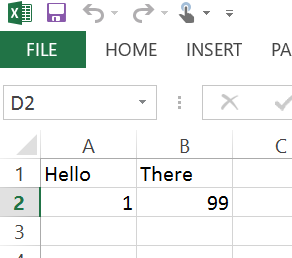
Consider the following spread-sheet;

image

I’ve saved this document as Book1.xlsx. If you haven’t downloaded the Open XML SDK 2.5 for Microsoft Office tools then rename the document to Book1.zip and open the Zip. I am not going to go into great depth about how the document packaging works, see the open xml developer site for more information. But basically each document is a Zip file containing a content catalogue and folders with the data represented in the document. So to examine the data in the first sheet you will find that located at; xl/worksheets/sheet1.xml

The first step is to open the document;

            FileOpenPicker opener = new FileOpenPicker();
            opener.ViewMode = PickerViewMode.Thumbnail;            
            opener.FileTypeFilter.Add(".xlsx");

            
            StorageFile file = await opener.PickSingleFileAsync();
            if (file != null)
            {
                XmlDocument worksheet = null;
                using (var fileStream = await file.OpenReadAsync())
                {
                    using (ZipArchive archive = new ZipArchive(fileStream.AsStream(), ZipArchiveMode.Read))
                    {
                        worksheet = this.GetSheet(archive, "sheet1");
                    }
                }
            }

You can see that we’ve opened the document as a Zip Archive, now we can read the specific sheet file held within, in this case I’m storing the result in an XmlDocument, this is just my choice of Xml parser;

        private XmlDocument GetSheet(ZipArchive archive, string sheetName)
        {
            XmlDocument sheet = new XmlDocument();
            ZipArchiveEntry archiveEntry = archive.GetEntry("xl/worksheets/" + sheetName + ".xml");

            using (var archiveEntryStream = archiveEntry.Open())
            {
                using (StreamReader reader = new StreamReader(archiveEntryStream))
                {
                    string xml = reader.ReadToEnd();
                    sheet.LoadXml(xml);
                }
            }

            return sheet;
        }

Now we have the document, we can grab a value, here via XPath

       private string ReadCell(XmlDocument worksheet, string cellAddress)
        {
            string value = string.Empty;           
            XmlElement row = worksheet.SelectSingleNodeNS("//x:c[@r='" + cellAddress + "']", "xmlns:x=\"http://schemas.openxmlformats.org/spreadsheetml/2006/main\"") as XmlElement;
            if (row != null)
            {
                value = row.InnerText;
            }
            
            return value;
        }

There you have it, you’ve read the data in cell B2.

Writing data in Excel

Let’s now change that value from 2 to 99.

using (var fileStream = await file.OpenStreamForWriteAsync())
                {
                    using (ZipArchive archive = new ZipArchive(fileStream, ZipArchiveMode.Update))
                    {
                        await WriteCell(archive, worksheet, "sheet1", "B2", "99");
                    }
                }

In this example I’ve chosen to simply remove the sheet from the archive and put a new version back.

        private async Task WriteCell(ZipArchive archive, XmlDocument worksheet, string sheetName, string cellAddress, string value)
        {            
            XmlElement row = worksheet.SelectSingleNodeNS("//x:c[@r='" + cellAddress + "']/x:v", "xmlns:x=\"http://schemas.openxmlformats.org/spreadsheetml/2006/main\"") as XmlElement;
            if (row != null)
            {
                row.InnerText = value;
            }

            string sheetFilename = "xl/worksheets/" + sheetName + ".xml";
            ZipArchiveEntry archiveEntry = archive.GetEntry(sheetFilename);
            archiveEntry.Delete();

            archiveEntry = archive.CreateEntry(sheetFilename);
            using (var archiveEntryStream = archiveEntry.Open())
            {
                using (DataWriter writer = new DataWriter(archiveEntryStream.AsOutputStream()))
                {
                    writer.WriteString(worksheet.GetXml());

                    await writer.StoreAsync();
                    await writer.FlushAsync();
                    writer.DetachStream();
                }               
            }
        }

Let’s open the file in Excel and check our result;


image

Looks good.


What else can you do?

We’ve seen a simple example of reading and writing to Excel. But these basic techniques allow you to do pretty much anything with any Office document. The underlying schema was developed to aid the use of tools, so anything is possible. Again I would point to Open XML SDK 2.5 for Microsoft Office and http://openxmldeveloper.org/ for information about how to interpret the various document types. My recommendation is to write an example document and use the SDK tools to learn how to reproduce it.

When you are developing a web site and want to use a custom font, via font-face, you might find that IE on Windows Phone refuses to use it. Turns out that IIS doesn’t include the mime-type by default so you need to add it. If you don’t have access to the site directly (maybe Azure web site or a shared server) you can add it in your site’s web.config webserver section;

<system.webServer>
    <staticContent>
      <mimeMap fileExtension=".woff" mimeType="application/x-font-woff" />
    </staticContent>
</system.webServer>

Burndown charts and 2 week Sprints, what’s the point?

I’ll be honest, I much prefer burn-up to burn-down charts. However, for some reason the tooling to support these is horribly lacking so I often find myself being presented with a well meaning burndown chart.

A burndown chart is there to show an estimate of how likely a team will deliver a block of work in an amount of time. A Sprint is there to provide a focused deliver of a block of work. The two often go together, and this is where I start to have an issue with them. When software delivery described an early delivery as 6 months it was very important to attempt to track if the development was on schedule. In order for a burndown chart to help with this the team needs to spend a certain amount of time recording what they’ve done and re-estimating what they have left to do. When Sprints first became popular a 4-6 week time-box was not unusual. This still represented an expensive period to fail in, so tracking was still important. Today a 2 week Sprint is very popular, if you fail then it’s not nice but lessons will have been learnt and you have only ‘lost’ 2 weeks. So is it necessary to track the progress of such a short time period? If you get to the end of the first week and your burndown trend isn’t on track, what are you going to do about it? To maintain the burndown chart the team have to expend time to keep the estimates updated. This doesn’t represent a trivial amount of time from a 2 week period. So…what is the point of a burndown chart for a 2 week Sprint? In my view you will be better off simply recording the outcome of the Sprint in terms of delivered items and save the effort on re-estimating and daily report production.

Is there room for Estimates and Forecasting?

Recently I attended the Lean Kanban UK conference and was interested to hear peoples opinions on estimating.

Estimating vs. Forecasting

Dan Brown’s (@KanbanDan) session, ‘Forecasting delivery, with oranges’ (see his blog post). The essence of session was that estimating the cost is in itself an expensive business an can be avoided. If you capture the facts about your deliveries then you can use this for future forecasting. I also believe in this idea as you are now dealing with the facts of the delivery, something that is promoted through the use of Kanban. Sure this still presents the problem that a forecast is not a fact, and as much as you scream the word ‘forecast’ the customer may only ever interpret this as a promise. But at least this way you are not burning the teams time drawing up guesses about the cost. A quote from a client with agile growing pains related to concentrating on cost estimates, ‘we’ve spent all this time talking about the process (estimates), and nothing on the features’. In my experience of software development this is not unusual, and is one of the reasons agile approaches are abandoned.

Estimating cost vs. Estimating Value

The same argument can also be re-written as cost vs. value as highlighted by Allan Kelly (@allankellynet), ‘No Projects, Beyond Projects’. Estimating cost, i.e how long will this take, is the wrong angle to take, estimating the true reason for the development is where the focus should be. At a simple level this is about prioritising what is really required, similar to the approach of the ‘five whys’. This is at the heart of agile but is often lost in the process, we need to deliver value, not just working software.

Ignoring requests for Estimates

So if estimating is bad then why should we do it? We have seen that forecasting can be used, but since that is evidence based it is not always possible or deemed accurate to use. I talked to a number of attendees about this issue and one of the common themes was, ‘we ignore the request’. One technique was to literally ignore the request and just keep delivering until trust was established. Another was to ignore it for the first delivery and then substitute forecasting. I also asked this question to a very well known developer and author, who I’ll think I keep their name secret (ask me directly and I’ll say), that they would provide a completely fabricated Microsoft Project Gantt chart which is then thrown away once the trust in deliveries is established.

Small one off fixed-priced projects

When you are bidding for a small project where there are a number of unknowns, including the customer, then you are left with choosing between finger in the air gut feelings or attempting a forecast based on categorising the project against previous deliveries for other customers.  Larry Maccherone (@LMaccherone ‘The impact of agile quantified‘) and Dimitar Bakardzhiev (@dimiterbak) (amongst other interesting points) both championed using statistics to aid in decision making. In terms of forecasting Monte Carlo Simulation (Intro with Excel, Dimitar’s SIP Monte Carlo & High Level Project Planning) looks to provide a relatively simple way to provide a worst-best forecast. However, has Dimitar pointed out it is best suited to when you can successfully match the project variables against previous statistics, including; solution type, technologies and team.

Conclusion

For me the conclusion is that estimating value is generally a bad idea. The ideal is to establish trust via deliveries, backed up with forecasting if necessary.

Myths of Agile

This is a post I’ve promised to write for a while, this isn’t a critic of ‘Agile’ in any of its guises but simply a guide to avoid incorrect statements.

Before I dive into this, let’s just remind ourselves of the Agile Manifesto;

Individuals and interactions over processes and tools
Working software over comprehensive documentation
Customer collaboration over contract negotiation
Responding to change over following a plan

That is, while there is value in the items on
the right, we value the items on the left more

Sprints therefore I’m Agile

A Sprint is essentially a time-box, nothing more nothing less. How the time-box is used depends on the team’s implementation. I’ve seen Sprints used to simply slice up months of development. Whilst I suspect that this practice is not uncommon I think most people would recognise a Sprint from definition popularised by the Agile strategy, getting close to process, of Scrum. Here a Sprint is typically used to create a small deliverable. There are many good reasons for this; quick feedback, leave in a deliverable state, focused priority based development, etc. However, a Sprint neither makes a development Agile nor it is necessary to be Agile. I say again, Sprint != Agile and Agile does not need Sprints.

Velocity will lead to predictable delivery

Another concept popularised by Scrum is that of a team’s Velocity. By attaching a notional cost to each item we deliver we can measure how long (or fast) a team takes to deliver them. Once we have the teams Velocity then we make better predictions about future deliveries. Once again I’m not going to judge the merits, or otherwise, of Velocity but I would like to point out the assumptions;

Velocity measurement is more accurate when you;

a) Retain the same team from Sprint to Sprint

b) The uncertainty/complexity of the tasks remains constant

When the team changes then Velocity becomes very suspect. How significant the change is will depend on the team changes but you need to be aware that it will affect the measurement.

Uncertainty/Complexity have always been the bugbear of software development and it is still true when using Velocity. Consider the concepts of Cynefin (taken from the excellent summary Agile Development and Retrospective Coherence)

clip_image001

Velocity is more useful when the tasks are in the ‘Order’ domains. These are the tasks that we fully understand regardless of if they are easy or complicated to implement. However, anything outside of that becomes an unknown. I.e. if your last Sprint was Ordered then you will have a velocity of O, but if your next Sprint in Complex then you are likely to have a very different velocity of C. This means that for the third Sprint your Velocity is (?)… O, C, O+C/2, etc. We cannot even say that all complex Sprints are always C. If you consciously look out for Complex tasks then you can mitigate them by converting them, as much as possible, to the Order domain via non-deliverable Spikes. In this strategy you honour the goal of velocity in the sense of knowing what will be soon be started, but not necessarily about stating how much you can deliver for any given future milestone.

Be warned, Velocity can be useful but it can also be very misleading. If you do choose to measure velocity then use it wisely.

Burn-down charts accurately show the state of the project

Another popular mechanism with Agile development is the Burn Down Chart. The premise is simple, start the graph with showing the amount of work to be done, and as the work is completed the graph will tend towards zero, i.e. the development has completed. However, in my experience this rarely shows an accurate view of the development. The problem is that teams do not stick with the items in a Sprint. Often other items creep in, be it additional features or bugs. Nothing wrong this, after-all we should be expecting change (not wishing to start a discussion about using the size of Sprint to mitigate this). The problem is that it is now very difficult to discern from old or new work. If the burn-down chart is a flat line is that telling you that you haven’t completed any work or that the input of work has matched the output? Whilst I’m struggling not to criticize Burn-Down charts it would remise not to mention Burn-Up charts that provide the same information but can also resolve this confusion. See Pawel Brodzinski’s excellent review of the issues.

Scrum or Kanban

This post has mentioned Scrum a few times, and there can be no denying its popularity with Agile devotees. Another popular strategy is that of Kanban. I have read a number of conversations that take the form of Scrum vs. Kanban and offer them up as a polar choice. Essentially Kanban is about assessing your current process and smoothing it out. If your current process, oh dear I’ve said process, is Scrum then you can apply Kanban to it. It’s not one or the other. In reality, if your development suits Kanban then over a period of re-assessment then you may find that many of the Scrum stages are also causing your bottlenecks and you will end up dissolving some of them, including Sprints. However, again that is not the conclusion of using Kanban, it is one possible outcome. It all depends on what best suits your particular issues.


Summary

I’ve had these conversations a number of times, so I hope other people will find it useful. When something is Agile, look back to the manifesto and evaluate the rationale. If it doesn’t help you with those goals then challenge why you should be using it.

Custom Audio notifications with ToastNotificationManager

I struggled to find documentation for this, so I’ve blogged it here for future reference

    ToastTemplateType toastTemplate = ToastTemplateType.ToastText02;
    XmlDocument toastXml = ToastNotificationManager.GetTemplateContent(toastTemplate);

    XmlNodeList toastTextElements = toastXml.GetElementsByTagName("text");
    toastTextElements[0].AppendChild(toastXml.CreateTextNode(title));
    toastTextElements[1].AppendChild(toastXml.CreateTextNode(message));

    var audio = toastXml.CreateElement("audio");
    audio.SetAttribute("src", "ms-appx:///MyAudio/CustomNotificationSound.mp3");
    audio.SetAttribute("loop", "false");

    toastXml.DocumentElement.AppendChild(audio);

    toastXml.DocumentElement.SetAttribute("launch", deepLink);
    ToastNotification toast81 = new ToastNotification(toastXml);
    ToastNotificationManager.CreateToastNotifier(MyAppId).Show(toast81);